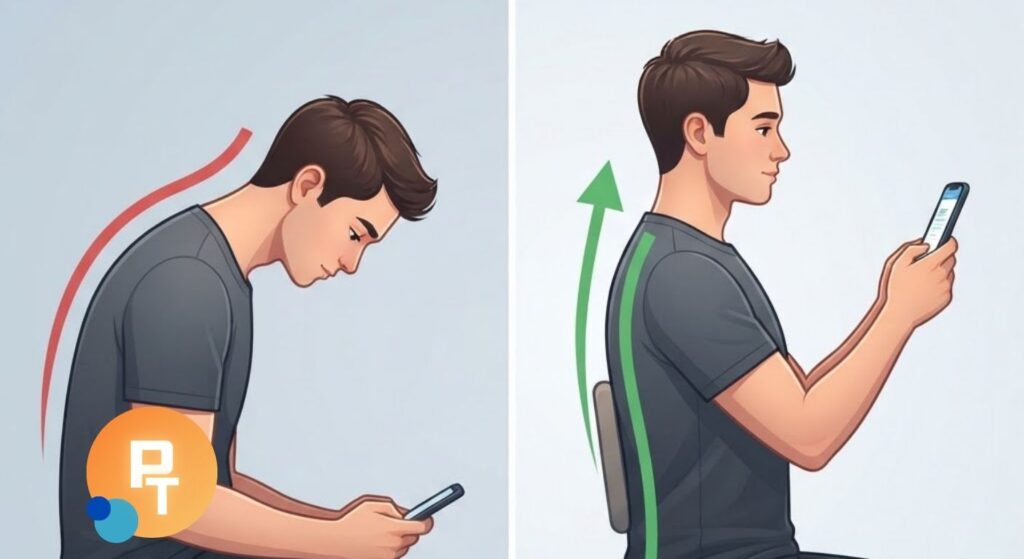
Phone text neck describes neck discomfort associated with prolonged smartphone use, particularly when looking down at a screen for extended periods.
Although looking down at your phone is not inherently harmful, sustained positions, limited movement, and repetitive device use can contribute to discomfort.
Simple ergonomic habits, regular movement, and appropriate neck exercises can help you use mobile devices more comfortably without giving up everyday activities.
What Is Phone Text Neck?
“Text neck” is an informal term used to describe neck pain, stiffness, or muscular discomfort that people associate with prolonged smartphone or tablet use.
It is not a formal medical diagnosis, and the term does not identify a specific damaged structure.
When you look down at your phone, your cervical spine moves into flexion, meaning your head bends forward relative to your neck.
This is a normal movement that the neck is designed to perform.
Problems may arise when you remain in a position that becomes uncomfortable, particularly without opportunities to move or change tasks.
Common complaints include:
- Neck stiffness after prolonged texting or scrolling.
- Aching around the back or sides of the neck.
- Muscle fatigue across the shoulders.
- Discomfort between the shoulder blades.
- Reduced comfort when turning the head.
- Headaches that sometimes accompany neck discomfort.
These symptoms are not exclusive to mobile device use.
Similar complaints can occur with prolonged computer work, reading, stress, sleep disturbances, or other musculoskeletal conditions.
From a physical therapy perspective, the important question is not simply how far someone bends their neck.
It is how their symptoms respond to activity, how long they remain in uncomfortable positions, and whether they can comfortably perform normal daily tasks.
How Smartphone Use Can Contribute to Neck Pain
The neck contains vertebrae, joints, muscles, ligaments, and other tissues that work together to support and move the head.
Looking down changes the demands placed on these structures, but it does not automatically cause injury.
Sustained cervical flexion can increase the effort required from some supporting muscles.
Holding the arms unsupported while using a phone may also contribute to shoulder fatigue.
Several habits can make mobile device use less comfortable:
- Prolonged viewing: Remaining in one position without changing it.
- Low screen position: Holding the phone near the lap for an extended period.
- Unsupported arms: Keeping the shoulders and arms raised or extended.
- Repetitive typing: Performing long typing sessions without varying hand activity.
- Limited movement: Spending long periods sitting or lying in the same position.
- High visual demand: Leaning toward the screen because the text is difficult to read.
Neck pain is multifactorial.
Physical activity, stress, sleep, previous neck symptoms, and individual sensitivity can influence how someone responds to smartphone use.
It would be inaccurate to suggest that every person who looks down at a smartphone will develop neck problems.
A person may comfortably read on a phone while looking slightly downward, whereas another person with an irritable neck may experience symptoms after a relatively short period.
This difference is one reason ergonomic recommendations should be adjusted to the individual rather than applied as rigid posture rules.
Proper Phone Ergonomics: How to Hold Your Smartphone
A practical starting point is to bring the phone closer to your natural line of sight while keeping your shoulders relaxed.
The goal is to reduce unnecessary strain without creating a new problem by holding the arms in an uncomfortable position.
The US Occupational Safety and Health Administration provides official ergonomic recommendations for mobile devices, including avoiding excessive neck bending and keeping the arms comfortably positioned.
Try these adjustments:
- Hold the phone higher when reading or watching videos.
- Keep your elbows reasonably close to your body.
- Support your forearms when possible.
- Let your shoulders remain relaxed rather than elevated.
- Avoid reaching your head forward to see the screen.
- Change positions when you notice muscle fatigue.
The phone does not need to remain exactly at eye level throughout the day.
Holding it too high for a prolonged period can fatigue the shoulders and arms.
For longer sessions, resting your elbows on a desk, chair armrests, or a cushion may make a higher screen position easier to maintain.
Sitting and Standing Positions for Phone Use
When sitting, choose a position that supports your body comfortably without forcing your back and neck into a rigid posture.
Useful sitting habits include:
- Rest your feet on the floor or another stable surface.
- Allow your back to contact the chair when comfortable.
- Keep the phone at a convenient viewing distance.
- Use armrests or cushions to support the elbows.
- Change your sitting position periodically.
When standing, distribute your weight comfortably between your feet and avoid remaining motionless for long periods.
You can hold the phone around chest height or higher, depending on what feels comfortable.
The appropriate position allows you to see the screen without excessive neck bending or sustained shoulder elevation.
There is no single perfect posture that must be maintained all day.
The OSHA guidance on working positions emphasizes changing positions frequently rather than remaining still in one posture.
Everyday Smartphone Habits That Reduce Neck Strain
Ergonomics becomes more useful when it fits naturally into daily routines.
Most people use their smartphones in several environments, so the same setup will not work everywhere.
The following table compares common mobile device habits with practical alternatives.
| Common habit | Possible problem | Practical adjustment |
|---|---|---|
| Reading with the phone on your lap | Sustained downward neck position | Raise the phone and support your elbows |
| Texting with elevated shoulders | Shoulder muscle fatigue | Relax the shoulders and support the arms |
| Watching long videos while holding the phone | Sustained arm and neck effort | Use a stable phone stand |
| Reading very small text | Leaning forward to see the screen | Increase text size or adjust viewing distance |
| Holding the phone between the ear and shoulder | Awkward neck positioning | Use speakerphone or a suitable headset |
| Long scrolling sessions | Limited movement variety | Pause, move, or change tasks |
| Using a tablet flat on a desk | Prolonged downward viewing | Use an adjustable stand |
Small changes are often more sustainable than trying to correct every aspect of posture at once.
Phone Use at Work or While Studying

People who regularly read documents, answer messages, or review information on mobile devices may benefit from arranging a more supportive workspace.
Consider these adjustments:
- Place your device on a stable stand for prolonged reading.
- Use a tablet stand when reviewing lengthy documents.
- Position the screen directly in front of you when practical.
- Use an external keyboard for extended tablet typing.
- Alternate between mobile and desktop devices when appropriate.
- Take opportunities to stand, walk, and move between tasks.
For example, a student reading course material on a tablet may find it more comfortable to raise the tablet on a stand rather than leaving it flat on a desk.
If extensive typing is required, an external keyboard can allow the screen and hands to be positioned more independently.
Using Your Phone in Bed
Using a smartphone in bed is not necessarily harmful, but some positions can become uncomfortable when maintained for a long time.
Lying on your side while twisting the neck toward the phone may create sustained asymmetrical loading.
Holding the phone above your face while lying on your back can also fatigue the arms.
More comfortable options include:
- Support your head with a suitable pillow.
- Avoid prolonged twisting of the neck.
- Support your arms with pillows when possible.
- Change positions when discomfort develops.
- Limit extended sessions in positions that consistently aggravate symptoms.
If using your phone in bed repeatedly produces neck discomfort, changing the position or switching to another activity is usually more practical than trying to maintain a supposedly perfect sleeping posture.
How Often Should You Take Breaks From Your Phone?

There is no established break interval that prevents text neck for everyone.
The amount of variation someone needs depends on their symptoms, activity, and tolerance for sustained positions.
A practical approach is to take short movement breaks regularly, especially during long reading, texting, or scrolling sessions.
You might use the following routine:
- Pause after a sustained period of device use.
- Lower your arms and relax your shoulders.
- Gently turn your head in both directions.
- Stand or walk briefly if you have been sitting.
- Resume your activity in a comfortable position.
Some people find a reminder every 20–30 minutes useful as a habit-building tool.
This is a practical option, not a clinically established threshold or mandatory schedule.
If symptoms begin earlier, change position sooner.
If you are comfortable and already moving frequently, you may not need a rigid reminder.
Brief interruptions are particularly useful when they encourage movement rather than simply replacing one static position with another.
The goal is to make movement a normal part of phone use, not to create anxiety about the number of minutes spent looking at a screen.
Physical Therapy Exercises for Phone-Related Neck Discomfort
Gentle movement and appropriately selected exercises can help manage nonspecific neck discomfort.
Exercise selection should depend on symptoms, physical capacity, and individual tolerance rather than the assumption that every phone user has the same muscular problem.
The following movements are commonly included in neck mobility and rehabilitation programs.
The NHS provides official neck exercise guidance that includes cervical movement and shoulder exercises.
Gentle Neck Mobility and Shoulder Exercises
1.Cervical retraction (chin tuck)
Sit or stand comfortably while looking forward.
Slowly draw your chin backward as though making a small double chin, without tilting your head downward.
- Keep the movement gentle and controlled.
- Avoid forcing the head backward.
- Hold briefly in a comfortable position.
- Relax and repeat several times as tolerated.
This movement practices cervical retraction and can be useful for maintaining comfortable neck mobility.
It does not permanently correct a particular spinal alignment.
2.Neck rotation
Begin in a relaxed sitting or standing position.
Slowly turn your head to one side within a comfortable range, return to the center, and repeat in the opposite direction.
- Move without jerking.
- Stay within a tolerable range.
- Avoid forcing the neck toward its end range.
- Stop if symptoms become significantly worse.
3.Gentle side bending
Slowly bring one ear toward the corresponding shoulder without raising the shoulder.
Return to the starting position and repeat on the opposite side.
- Keep the shoulders relaxed.
- Avoid pulling strongly on the head.
- Use slow, controlled movements.
- Reduce the range if discomfort increases.
4.Shoulder blade movement
Sit or stand with the arms relaxed.
Gently move the shoulder blades backward toward one another, then release.
- Avoid shrugging the shoulders.
- Keep breathing normally.
- Do not force the shoulder blades together.
- Return to a relaxed position between repetitions.
5.Upper-back extension
Sit in a stable chair with a supportive backrest.
Gently lift your chest and extend your upper back over the chair back if the setup allows comfortable movement.
- Keep the movement small initially.
- Avoid forcing the neck backward.
- Breathe naturally.
- Stop if the movement causes dizziness or worsening symptoms.
Exercises should generally remain comfortable or produce only tolerable, temporary symptoms.
Significant or progressively increasing pain is a reason to modify the exercise and seek professional advice if symptoms persist.
These movements are examples, not a personalized treatment prescription.
People with recent trauma, neurological symptoms, significant dizziness, or known cervical instability should obtain appropriate clinical guidance before attempting neck exercises.
Can Better Posture Prevent Text Neck?
Improving device ergonomics may reduce uncomfortable exposure to sustained positions, but posture alone cannot reliably predict or prevent neck pain.
The human spine is designed to move through different positions.
Cervical flexion, rotation, and extension are normal movements, and none should automatically be considered harmful.
The misconception that every forward-head position causes spinal damage can make people unnecessarily fearful of ordinary activities.
A more useful approach includes:
- Finding comfortable positions for the task.
- Avoiding prolonged positions that consistently aggravate symptoms.
- Maintaining regular neck and upper-body movement.
- Gradually building tolerance for everyday activities.
- Staying physically active outside screen time.
For people who experience neck pain, physical therapy may include mobility exercises, progressive strengthening, education, and activity modification.
The goal is not to force the neck into a fixed alignment.
It is to improve movement confidence, functional capacity, and symptom management.
Smartphone Settings and Accessories That May Help
Some changes can make your phone easier to use without requiring expensive ergonomic equipment.
Helpful accessibility and device features include:
- Larger text: Reduces the need to bring the face closer to the screen.
- Voice dictation: Offers an alternative to prolonged manual typing.
- Speakerphone: Reduces the need to hold a phone against the ear.
- Adjustable phone stand: Supports the device during extended reading or video viewing.
- External keyboard: Makes extended tablet typing more practical.
- Screen brightness controls: Improve viewing comfort under different lighting conditions.
- Screen-time reminders: Help users notice prolonged sessions and introduce movement breaks.
These tools are optional.
Their value depends on whether they make a specific task easier or more comfortable.
For example, someone who spends a long time responding to messages may benefit from using voice dictation for part of their work.
Another person might prefer placing the device on a stand while reading.
An accessory should not introduce a new source of discomfort.
A stand positioned too high or too far away may still lead to awkward neck and shoulder positioning.
When Neck Pain Needs Physical Therapy or Medical Assessment

Not every episode of neck discomfort requires professional treatment.
Mild symptoms associated with prolonged activity may improve after changing positions, moving gently, and returning to comfortable daily activities.
However, persistent or worsening symptoms deserve appropriate assessment.
A physical therapist can evaluate:
- Cervical movement and symptom response.
- Functional limitations during work and daily activities.
- Shoulder and upper-back mobility.
- Strength and movement tolerance.
- Relevant neurological findings within the therapist’s scope.
- Ergonomic factors that may contribute to symptom aggravation.
Physical therapy assessment should not assume that smartphone use is the cause simply because the person frequently uses a mobile device.
A clinician should consider alternative explanations and determine whether further medical evaluation is necessary.
Arrange medical assessment for symptoms such as persistent neck pain, worsening arm pain, new tingling or numbness, or weakness.
Seek urgent medical attention for concerning symptoms including:
- New or progressive weakness affecting the arms or legs.
- Significant problems with walking, balance, or coordination.
- New bladder or bowel dysfunction alongside neurological symptoms.
- Severe neck pain following significant trauma.
- Neck pain accompanied by fever, severe headache, or marked systemic illness.
These symptoms should not be attributed to ordinary text neck without further assessment.
For additional patient guidance, the NHS neck pain information page explains common self-management approaches and when to seek healthcare advice.
A Practical Daily Routine for Comfortable Phone Use
The most effective ergonomic routine is one that fits your actual activities.
Rather than monitoring your posture constantly, focus on a few manageable habits throughout the day.
During morning phone use
- Choose a comfortable sitting or standing position.
- Support your elbows when reading for longer periods.
- Raise the phone when a low position becomes uncomfortable.
- Avoid remaining in bed in a twisted position for extended periods.
During work or study
- Use a stand for longer reading sessions when available.
- Increase text size if you frequently lean toward the screen.
- Switch to a keyboard for extensive typing when practical.
- Change tasks and positions periodically.
During breaks
- Walk briefly after prolonged sitting.
- Move the neck gently through comfortable ranges.
- Relax the arms and shoulders.
- Return to normal activities without excessive posture monitoring.
During evening screen time
- Avoid unsupported arm positions that cause fatigue.
- Change positions while watching longer videos.
- Use cushions or armrests when helpful.
- Stop or modify activities that repeatedly provoke symptoms.
For someone with recurrent discomfort, it can be useful to track which activities trigger symptoms and which adjustments improve tolerance.
For example, if neck aching begins during long periods of scrolling with the phone resting on the lap, try raising the screen, supporting the forearms, and introducing more movement.
If symptoms remain unchanged despite these modifications, posture may not be the main contributing factor, and a broader clinical assessment may be appropriate.
Conclusion
Phone text neck is best managed by combining comfortable mobile device positioning with regular movement and appropriate physical activity.
Looking down at a smartphone is a normal movement, but remaining in uncomfortable positions for prolonged periods can contribute to neck and shoulder symptoms.
Support your arms, adjust screen height when practical, vary your position, and use gentle movement to maintain comfort.
Persistent, worsening, or neurologically associated symptoms warrant appropriate professional assessment rather than assuming that posture is the only cause.
Frequently Asked Questions About Phone Text Neck
1. What is phone text neck?
Phone text neck is an informal description of neck discomfort associated with prolonged smartphone or tablet use, particularly when looking downward for extended periods.
It is not a specific medical diagnosis, and similar symptoms can occur for reasons unrelated to mobile devices.
2. Can looking down at a phone damage your cervical spine?
Looking down is a normal cervical movement and does not automatically damage the spine.
Prolonged positions may contribute to discomfort in some individuals, but posture alone cannot establish that structural damage has occurred.
Persistent symptoms require assessment rather than assumptions based on head position.
3. What is the best position for holding a smartphone?
A comfortable position generally keeps the phone near your natural line of sight while allowing the shoulders to relax and the arms to remain supported when possible.
There is no universally ideal screen height, so adjust the position according to the task and your comfort.
4. How often should I take breaks from my phone?
There is no single medically established interval for every smartphone user.
Short, regular movement breaks can be helpful during prolonged sessions, particularly when stiffness or fatigue develops.
The aim is to interrupt sustained positions rather than follow a rigid timer.
5. Can text neck cause headaches?
Neck discomfort and certain headaches can occur together, and cervical musculoskeletal problems may contribute to some headache presentations.
However, headaches have many possible causes, and smartphone use should not automatically be considered responsible.
New, severe, unusual, or persistent headaches require appropriate medical assessment.
6. Do chin tucks help with text neck?
Chin tucks are a commonly used cervical movement exercise that may help some individuals improve movement comfort and tolerance.
They are not necessary for everyone and do not permanently reposition the spine.
Their usefulness depends on symptoms and individual response.
7. Is using a smartphone while lying in bed bad for the neck?
Using a phone in bed is not inherently harmful, but prolonged neck twisting or unsupported arm positions can become uncomfortable.
Supporting the head and arms, adjusting the viewing angle, and changing position regularly may help reduce symptoms.
8. Can phone text neck affect the shoulders and upper back?
Neck discomfort during mobile device use may occur alongside shoulder and upper-back symptoms.
Sustained arm positions, limited movement, and prolonged sitting can contribute to muscular fatigue.
However, shoulder or upper-back pain may have other causes and should be assessed if symptoms persist.
9. How long does it take for phone-related neck pain to improve?
Recovery varies according to the underlying cause, symptom severity, activity tolerance, and other individual factors.
Mild, nonspecific neck discomfort often improves with continued comfortable movement and appropriate activity modification.
Symptoms that persist for several weeks, worsen, or interfere substantially with daily activities should be evaluated.
10. Should I see a physical therapist for text neck?
Physical therapy may help when neck discomfort is persistent, recurrent, or limits normal activities.
A physical therapist can assess movement, function, symptoms, and relevant ergonomic factors before recommending an individualized rehabilitation approach.
New neurological symptoms or other warning signs may require medical assessment rather than routine exercise advice.