Standing All Day Isn’t Better: How to Use a Sit-Stand Desk
October 4, 202613 min read
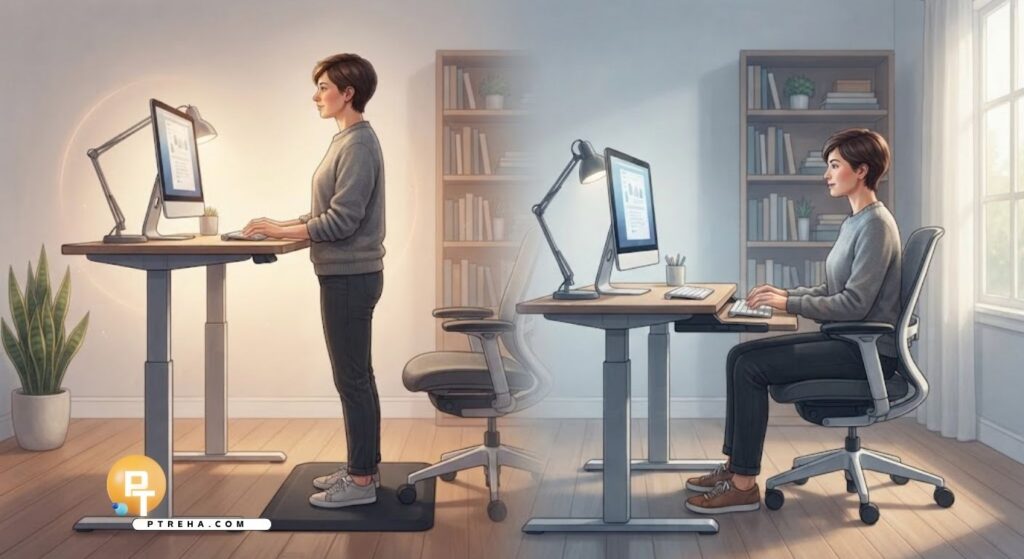
A standing desk can help reduce long periods of uninterrupted sitting, but standing all day is not the goal.
The most useful standing desk best practices focus on regularly changing position, maintaining a comfortable workstation, adding short periods of movement, and adjusting sitting and standing time according to symptoms and work demands.
Standing Desk Best Practices: How Long Should You Stand vs. Sit?
There is no single scientifically established sit-to-stand ratio that is appropriate for every office worker.
Research supports reducing prolonged static postures, but it does not establish one exact number of minutes that everyone should sit or stand.
From a physical therapy perspective, the important principle is postural variation.
Instead of asking whether sitting or standing is better, think about how frequently you can change between comfortable positions.
A practical work pattern may include:
Sitting for focused computer tasks.
Standing periodically during the workday.
Walking briefly between work periods.
Changing position before significant discomfort develops.
Avoiding several hours of uninterrupted sitting.
Avoiding several hours of stationary standing.
Using phone calls as opportunities to stand or walk.
Adjusting the schedule according to fatigue and symptoms.
The CDC/NIOSH guidance on office environments emphasizes avoiding sitting or standing for too long and notes that short breaks during computer work can help reduce discomfort.
This means the most useful question is often not “How many hours should I stand?” but “How frequently am I changing position and moving?”
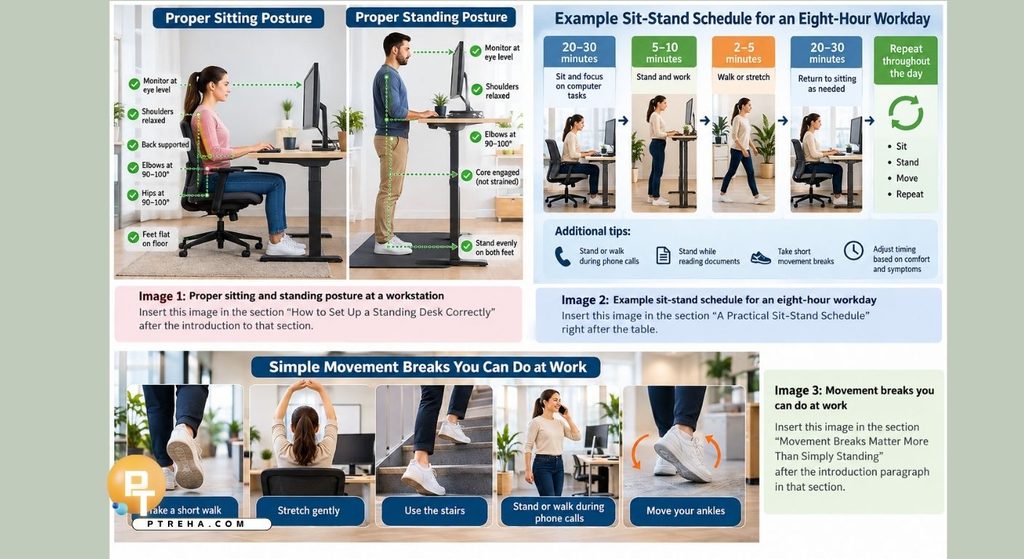
A Practical Sit-Stand Schedule
For someone who is new to a standing desk, short and frequent standing periods are generally more practical than trying to stand for several hours immediately.
One example is:
Work period
Suggested position or activity
First 20–30 minutes
Comfortable sitting
Next 5–10 minutes
Standing
Brief transition
Walk, stretch, or change task
Next work block
Return to sitting as needed
Later work blocks
Continue alternating positions
Calls or reading
Stand or walk when practical
These times are not strict medical thresholds.
They are simply a starting framework that can be modified according to comfort, workload, fitness, symptoms, footwear, and the workstation.
Someone accustomed to standing may comfortably use longer standing periods.
Someone experiencing foot, knee, hip, or back fatigue may benefit from shorter periods.
The objective is to avoid turning either posture into another prolonged static position.
A simple rule to remember
Try to:
Sit.
Stand.
Move.
Repeat.
Movement remains an important part of the equation.
Changing from eight hours of sitting to eight hours of standing is not the intended use of a sit-stand workstation.
Why Standing All Day Is Not Better Than Sitting All Day
Standing desks are sometimes promoted as though standing automatically represents a healthier posture.
This is an oversimplification.
Prolonged stationary standing can also produce physical fatigue and discomfort.
NIOSH has reported associations between prolonged occupational standing and problems including:
Lower-back discomfort.
General muscular fatigue.
Leg discomfort.
Foot discomfort.
Lower-limb tiredness.
Leg swelling in some workers.
The key distinction is between standing and moving.
Standing almost motionless in front of a monitor is still a relatively static activity.
Walking to another room, taking stairs, changing tasks, shifting position, or performing a brief mobility break provides more movement than simply raising the desk.
Therefore, a standing desk should be viewed as a tool for increasing postural options, not as a substitute for physical activity.
The goal of a standing desk is not maximum standing time. It is greater freedom to change position throughout the workday.
How to Set Up a Standing Desk Correctly
A poorly adjusted standing desk can simply replace one uncomfortable posture with another.
Start by adjusting the desk to your body rather than forcing your body to adapt to the desk.
Keyboard and mouse position
Your keyboard should generally be positioned so that you can work without repeatedly elevating the shoulders or excessively bending the wrists.
Aim for:
Elbows relatively close to the body.
Forearms approximately parallel with the floor.
Shoulders relaxed rather than shrugged.
Wrists close to a neutral position.
Mouse positioned close to the keyboard.
Frequently used objects within easy reach.
If the desk is too high, the shoulders may elevate while typing.
If it is too low, you may lean forward or excessively bend the neck and trunk.
Monitor position
Position the monitor directly in front of you whenever possible.
A practical setup includes:
Screen approximately an arm’s length away, adjusted for visual comfort.
Main monitor centered in front of the body.
Screen height that limits sustained downward or upward neck positioning.
Minimal need to rotate the head repeatedly.
Text size large enough to read without leaning toward the screen.
People using multiple monitors may need to modify the arrangement according to how frequently each screen is used.
Keep the workstation symmetrical
Frequently used items should remain close.
This includes:
Keyboard.
Mouse.
Phone.
Notepad.
Documents.
Frequently used controls.
Repeated reaching or trunk rotation can contribute to unnecessary physical loading.
The OSHA computer workstation guidance similarly recommends changing working positions, using neutral postures, walking periodically, and performing some work tasks while standing.
There is no need to maintain a rigid “perfect posture.”
The human body is designed to move, and small changes in position are normal.
A comfortable standing position typically allows you to:
Keep the head comfortably aligned over the trunk.
Keep the shoulders relaxed.
Keep the elbows near the body.
Avoid constantly leaning on the desk.
Distribute weight comfortably through both feet.
Change weight distribution periodically.
Avoid locking the knees rigidly.
Move freely without workstation obstruction.
Trying to stand perfectly upright without moving for long periods can itself become tiring.
Instead, allow natural variability.
You can occasionally:
Shift weight from one leg to the other.
Place one foot on a small footrest.
Take a few steps.
Change your stance width.
Sit for the next work task.
Walk while taking a phone call.
Variation is usually more useful than trying to maintain one idealized posture continuously.
How Long Should Beginners Stand at a Desk?
A common mistake is increasing standing time too aggressively during the first few days of using a height-adjustable desk.
Your legs and feet may not be accustomed to the new workload.
Start with short standing periods.
For example:
Stand for 5–10 minutes.
Return to sitting when fatigue begins.
Repeat several times during the workday.
Increase standing periods gradually if comfortable.
Insert walking whenever possible.
You do not need to reach a specific standing target immediately.
Symptoms are useful feedback.
Mild muscular fatigue after changing your normal routine may occur, but progressively increasing pain should not be treated as something you simply need to “push through.”
Signs that you may be standing too long
Consider changing position if you notice:
Increasing foot soreness.
Calf fatigue.
Knee discomfort.
Hip discomfort.
Increasing lower-back discomfort.
Persistent leg heaviness.
A tendency to lean heavily onto the desk.
Constant shifting because standing has become uncomfortable.
These symptoms do not automatically indicate an injury.
They may simply indicate that it is time to sit, walk, change position, or review the workstation setup.
Sitting Still Matters: Set Up Your Chair Properly
Using a standing desk does not eliminate the need for a good sitting setup.
If you spend part of the day sitting, the chair remains an important component of the workstation.
When seated:
Support the feet on the floor or a suitable footrest.
Keep the thighs comfortably supported.
Use the backrest rather than hovering away from it.
Adjust the lumbar support for comfort.
Keep the keyboard and mouse close.
Relax the shoulders.
Avoid repeatedly reaching forward.
Change sitting position periodically.
A slightly reclined sitting position may also be comfortable for some computer tasks.
The idea that there is only one acceptable seated posture is misleading.
The better strategy is to have several comfortable working positions available and move between them.
Movement Breaks Matter More Than Simply Standing
A standing desk can reduce sitting time, but it should not create the impression that standing replaces exercise.
Standing is different from walking.
Walking involves repeated muscle activity and joint movement throughout the lower limbs, whereas stationary standing may involve relatively little movement.
During the workday, look for opportunities to add actual movement.
Useful options include:
Walk while making phone calls.
Walk to speak with a colleague when practical.
Refill your water bottle.
Take stairs where appropriate.
Walk briefly between meetings.
Perform a few comfortable shoulder movements.
Move the ankles after prolonged computer work.
Change tasks periodically.
Stand while reviewing documents.
Take brief movement breaks away from the screen.
Even a very well-designed workstation cannot compensate completely for an otherwise inactive day.
Think of the standing desk as one component of an active workstation rather than a treatment by itself.
Can Standing Desks Help Lower-Back Discomfort?
They may help some people, but the effect should not be overstated.
A systematic review examining sit-stand workstations found that they may reduce low-back discomfort in sedentary workers, while also noting that the evidence did not establish a precise sit-to-stand dosage.
You can review the research through the PubMed systematic review on sit-stand workstations and low-back discomfort.
A standing desk should not automatically be considered treatment for back pain.
Back pain can have many contributing factors, including:
Workload.
Sleep.
Physical activity.
Previous injury.
Workstation configuration.
Repetitive tasks.
Physical capacity.
Stress.
Individual health factors.
Changing workstation position can be useful when prolonged sitting aggravates symptoms, but persistent or worsening pain may require an individual assessment rather than simply increasing standing time.
Common Standing Desk Mistakes
A height-adjustable desk does not automatically create an ergonomic workstation.
Several habits can reduce its usefulness.
1. Standing for hours without moving
This simply replaces prolonged sitting with prolonged standing.
Instead:
Change position regularly.
Walk periodically.
Sit when standing becomes tiring.
2. Setting the desk too high
A desk that is too high can encourage elevated shoulders and awkward wrist positioning.
Adjust it so the arms can remain comfortable while typing.
3. Setting the monitor too low
Raising the desk does not necessarily raise the monitor enough.
Check your screen position separately after every major desk adjustment.
4. Leaning heavily on the desk
Occasional support is normal, but constant leaning may indicate fatigue or an unsuitable desk height.
Change position instead.
5. Standing barefoot on a hard floor all day
Surface and footwear can influence comfort during prolonged standing.
Comfortable, supportive footwear may help some people tolerate standing more easily.
6. Buying an anti-fatigue mat and then standing longer
A mat may improve comfort for some workers, but it does not make prolonged stationary standing desirable.
You should still change position.
7. Ignoring the sitting setup
You still need an appropriate chair and seated workstation.
A sit-stand desk works best when both positions are comfortable.
A Better Standing Desk Routine for an Eight-Hour Workday
Rather than calculating a rigid sitting-versus-standing percentage, organize your work around frequent transitions.
For example, your morning could include:
Begin seated while answering detailed emails.
Stand during a short call.
Sit during concentrated writing.
Walk briefly before the next task.
Stand while reading a document.
Sit when the legs begin to feel tired.
Later in the day:
Change position after meetings.
Walk during phone calls when practical.
Stand during simple administrative tasks.
Sit for precision mouse or keyboard work if more comfortable.
Take brief movement breaks away from the workstation.
This approach naturally distributes different postures across the day.
It is often more sustainable than using a timer that forces you to stand despite discomfort.
When Should You Change Position?
Do not rely only on the clock.
Your body also provides useful cues.
Consider moving or changing position when you notice:
Restlessness.
Increasing muscular fatigue.
Neck stiffness.
Lower-back stiffness.
Foot discomfort.
Leg heaviness.
Shoulder tension.
Reduced concentration associated with discomfort.
Ideally, change position before symptoms become pronounced.
Work demands also matter.
Standing may work well for:
Video meetings.
Phone calls.
Reading.
Reviewing documents.
Short administrative tasks.
Sitting may be preferable for:
Detailed typing.
Precision mouse tasks.
Long writing sessions.
Tasks requiring substantial concentration.
There is no clinical requirement to perform a particular task while standing.
Choose the position that allows comfortable, efficient work, and then change position periodically.
Who May Need Individual Advice Before Increasing Standing?
Most healthy office workers can experiment gradually with a sit-stand workstation.
However, individual circumstances matter.
People with significant:
Foot pain.
Knee pain.
Hip pain.
Persistent back pain.
Balance limitations.
Lower-limb weakness.
Neurological symptoms.
Recent musculoskeletal injury.
may need a more individualized approach.
Standing time may need to be modified according to functional tolerance.
Seek appropriate professional assessment if pain is persistent, progressively worsening, associated with significant weakness or numbness, follows substantial trauma, or is otherwise medically concerning.
The standing desk itself should not be used to diagnose or treat an unexplained health condition.
Conclusion
The most effective standing desk best practices are based on variation rather than finding a perfect sit-to-stand ratio.
Use sitting, standing, brief walking, and task changes throughout the day instead of remaining in either sitting or stationary standing for prolonged periods.
For many people, starting with short standing periods of around 5–10 minutes between longer seated work blocks is a practical way to adapt.
Increase or decrease those periods according to comfort rather than treating them as mandatory targets.
Set up both your seated and standing workstation carefully, move regularly, and remember that a standing desk is primarily a tool for creating more opportunities to change position.
Frequently Asked Questions
How long should I stand at a standing desk at one time?
There is no universally established duration.
Beginners can start with short periods such as 5–10 minutes and gradually increase them if comfortable.
The important principle is avoiding prolonged stationary standing.
What is the best sitting-to-standing ratio?
Research has not established one ideal ratio for everyone.
A better strategy is to alternate positions regularly and include actual movement throughout the workday.
Is standing for eight hours better than sitting for eight hours?
No.
Prolonged stationary standing can also contribute to fatigue and musculoskeletal discomfort.
Alternating sitting, standing, and movement is generally a more practical approach.
How often should I switch between sitting and standing?
Change position regularly rather than remaining static for several hours.
Some people find transitions every 20–30 minutes comfortable, while others prefer shorter or longer intervals.
Individual tolerance matters.
Is a standing desk good for lower-back pain?
It may reduce discomfort for some sedentary workers, particularly when prolonged sitting aggravates symptoms.
However, a standing desk is not a treatment for every type of back pain.
Should I stand as soon as my back hurts from sitting?
Changing position may help reduce discomfort associated with prolonged sitting, but you can also walk briefly or adjust your seated posture.
Persistent or worsening pain deserves appropriate assessment.
Do I need an anti-fatigue mat?
Not everyone needs one.
A suitable mat may improve standing comfort, particularly on hard flooring, but it should not encourage you to remain standing for excessively long periods.
Should I wear shoes while using a standing desk?
Comfortable footwear can help during longer periods of standing.
The appropriate choice depends on your flooring, workplace, individual foot mechanics, and comfort.
Does standing at work count as exercise?
Standing increases postural variation but should not be considered a replacement for regular physical activity.
Walking and other forms of movement involve substantially more muscular activity.
What is the most important standing desk rule?
Avoid replacing prolonged sitting with prolonged standing.
A well-used sit-stand desk allows you to sit, stand, move, and change position regularly throughout the workday.