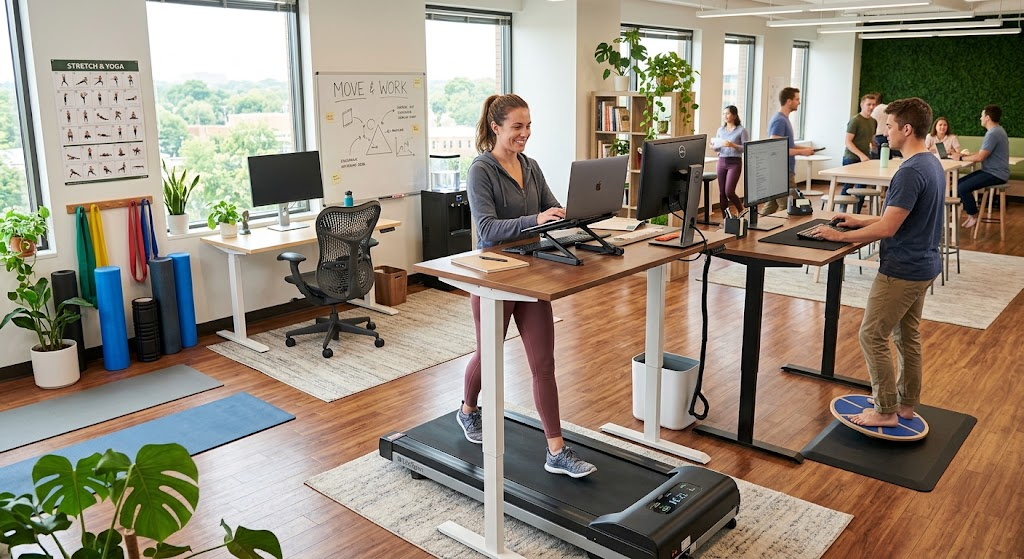
A movement-friendly workspace is one that makes changing position easy, so you are never stuck in a single posture for hours.
It does not depend on expensive equipment.
A neutral setup, planned posture changes and a layout that gives you reasons to stand up cover most of what matters, and this guide walks through each piece along with what official ergonomic guidance actually says.
What a Movement-Friendly Workspace Actually Means
In clinic, the pattern I see most often is not a bad chair but a still body.
People arrive with stiff necks and aching lower backs after long stretches in a position that looked perfectly correct on paper.
The problem is rarely one posture; it is holding any posture for too long.
OSHA’s guidance on good working positions makes the same point: even a well-aligned posture is not healthy if you hold it for prolonged periods, so you should change position frequently through the day.
A movement-friendly workspace builds that into the setup.
In practice it usually means:
- A desk, chair and screen arrangement that supports a neutral posture
- Easy ways to alternate between sitting, standing and walking
- Short, frequent pauses rather than one long break
- Frequently used items placed so you do not strain to reach them
Start With a Neutral Setup
Movement works best from a good starting position.
OSHA describes neutral posture as a comfortable working position in which your joints are naturally aligned, which reduces strain on muscles, tendons and the skeleton.
The following points come from its good working positions page:
- Hands, wrists and forearms are straight and roughly parallel to the floor
- Head is level, facing forward and in line with the torso
- Shoulders are relaxed and elbows stay close to the body, bent between about 90 and 120 degrees
- Back is supported, with thighs and hips supported and generally parallel to the floor
- Feet are supported by the floor, or by a footrest if the desk height cannot be adjusted
For the screen, OSHA’s monitor guidance shows the top of the monitor at or just below eye level.
If you want a structured way to review your own desk, the OSHA workstation evaluation checklist walks through posture, monitor, keyboard and chair in turn.
Quick Reference: Setup Checkpoints
This table condenses the setup points above into a check you can run in under a minute.
Individual bodies differ, so treat the targets as starting points rather than fixed rules.
| Area | What to aim for | Quick self-check |
|---|---|---|
| Monitor | Top at or just below eye level | Head stays level, not tipped back or down |
| Elbows | Close to the body, bent roughly 90 to 120 degrees | Shoulders feel relaxed, not shrugged |
| Wrists and forearms | Straight and roughly parallel to the floor | No bending up or sideways while typing |
| Back and hips | Back supported, thighs roughly parallel to the floor | Lower back rests against the chair support |
| Feet | Flat on the floor or on a footrest | Nothing dangling or tucked under the chair |
| Standing desk height | Work surface near standing elbow height | Arms sit as they do when seated |
Build in Posture Changes Through the Day
A sit-stand desk is the most obvious tool, but it is not the only one.
The Canadian Centre for Occupational Health and Safety explains in its sit/stand desk guidance that being able to alternate positions helps people vary their posture more often.
It also notes the downsides, including the cost of the desk and the foot, knee, hip and back problems that standing too long can cause.
When you stand, the same source recommends:
- Setting the work surface at roughly standing elbow height
- Keeping the keyboard and mouse aligned as they are when you sit
- Wearing supportive footwear and, where appropriate, using an anti-fatigue mat
- Shifting your weight from leg to leg, or using a footrest to help with this
How Long Should You Sit or Stand?
There is no single agreed schedule.
CCOHS notes that recommendations range from sitting for an hour and standing for five minutes to switching every 20, 30, 45 or 60 minutes, and that your health professional may advise differently.
The consistent message is to alternate as needed and allow time for your body to adjust.
It also mentions early studies suggesting some people drift back to sitting most of the time once the novelty wears off.
A simple reminder, such as standing for each phone call, helps the habit last.
No Sit-Stand Desk? Try These Instead
You can create the same variety without new furniture.
These are general suggestions rather than official rules:
- Stand or walk during phone calls and short meetings
- Make small adjustments to your chair or backrest during the day
- Work from a counter or high surface for a short task, if one is available
- Walk to a colleague instead of sending a message when it makes sense
Micro-Breaks That Fit a Real Workday
OSHA’s evaluation checklist asks whether work is organized so you can vary tasks or take micro-breaks, which are brief recovery pauses at the workstation.
They work because they are small enough to actually happen.
A thirty-second reset you take every time is more useful than a ten-minute stretch you keep skipping.
Ideas that fit most offices and home desks:
- Stand up, roll your shoulders back and take a few easy breaths
- Walk to refill a water bottle rather than keeping one at your desk
- Do a few gentle heel raises or a slow calf stretch while standing
- Look away from the screen and let your eyes rest on a distant point
- Open the chest by clasping your hands behind you for a few seconds
Tie them to cues you already have, such as sending an email, finishing a call or the end of a task, so you do not rely on remembering.
Arrange the Space So Movement Happens Naturally
Layout shapes behavior more than willpower does.
If everything you need sits within arm’s reach of a fixed chair, you will rarely have a reason to get up.
A few deliberate choices create gentle prompts:
- Keep the printer, water and storage a short walk away rather than beside you
- Place items you use constantly, such as the mouse and phone, within easy reach to avoid repeated stretching
- Use a speakerphone or headset instead of cradling a phone between ear and shoulder
- Leave clear floor space beside the desk so standing, stretching and pivoting are not awkward
- Make sure cables and storage do not make adjusting a height-adjustable desk difficult
The balance matters.
You want the things you use all the time close, and the things that prompt a walk slightly further away.
How Much Movement Is Enough?
Workplace posture changes are one piece of a larger picture.
The CDC’s physical activity guidance for adults recommends at least 150 minutes of moderate-intensity activity a week plus two days of muscle-strengthening activity.
It adds that you do not need to do it all at once, that some activity is better than none, and that adults who sit less and do any amount of moderate or vigorous activity gain some health benefit.
The World Health Organization’s guidelines also recommend reducing sedentary behavior, but the evidence was not strong enough to set a specific time limit for sitting.
That is why you will see no universal “stand every X minutes” rule here.
A practical approach looks like this:
- Treat desk movement as a supplement to exercise, not a replacement for it
- Spread short bursts of activity across the day when long sessions are hard to fit
- Build up gradually if you are new to standing work or to exercise
- Check with a health professional before starting a new program if you have a medical condition
Common Mistakes to Avoid
Most setups go wrong in predictable ways.
Spotting them early saves discomfort later.
- Switching to standing all day instead of alternating, which can shift the strain to feet, knees, hips and back
- Treating one “perfect” posture as the goal and holding it rigidly
- Setting a reminder, then ignoring it when work gets busy
- Working on a laptop on a low surface for long periods without adjusting screen or keyboard height
- Ignoring early warning signs such as repeated stiffness or tingling after work
When to Get Professional Help
A better workspace helps many people, but it does not replace an assessment when symptoms are significant.
Consider seeing a physical therapist or doctor if you notice:
- Pain that persists or keeps getting worse despite changing your setup
- Numbness, tingling or weakness in the arms, hands, legs or feet
- Pain that limits sleep or everyday activities
- Discomfort that returns every day at the same point in your workday
A clinician can look at how you actually move and sit, and fit the advice to your body, your job and any existing condition.
Many workplaces also offer ergonomic assessments, so it is worth asking.
Conclusion
A movement-friendly workspace comes down to three habits: a neutral setup, regular changes of position, and a layout that nudges you to move.
Official guidance from OSHA and CCOHS agrees that no single posture suits hours of work, and that short, frequent changes beat rigid perfection.
Start small.
Check your setup against the table, pick one or two micro-break cues, and add a standing option if you can.
If symptoms persist, get a professional opinion rather than adjusting indefinitely on your own.
FAQ
What is a movement-friendly workspace?
It is a work area arranged so that changing position is easy and routine.
That usually combines a neutral desk setup, options to sit, stand or walk, and a layout that gives you natural reasons to get up.
The goal is variety in posture rather than finding one ideal position.
Do I need a standing desk to have one?
No.
A height-adjustable desk makes alternating positions easier, but you can create variety by standing during calls, walking for water, and adjusting your chair through the day.
If you do buy one, CCOHS notes that cost is a drawback and that the setup still needs to suit you both sitting and standing.
How often should I change position?
There is no single agreed interval.
CCOHS reports that recommendations range from standing for five minutes after an hour of sitting to switching every 20 to 60 minutes.
Pick a rhythm you can keep up and adjust it based on how your body feels.
Is standing all day better than sitting all day?
Not necessarily.
CCOHS warns that standing too long may lead to foot, knee, hip and back problems.
Alternating between positions is the more consistent recommendation.
How high should my monitor be?
OSHA’s computer workstation guidance places the top of the monitor at or just below eye level, with the head level and in line with the torso.
If you find yourself tipping your head back or looking steeply down, the screen height needs adjusting.
Can a footrest help?
It can.
OSHA notes that feet should be fully supported by the floor, or by a footrest if the desk height is not adjustable.
CCOHS also suggests a footrest while standing to help shift your weight.
What can I do without buying any equipment?
Take frequent short breaks, stand for calls, keep frequently used items within easy reach, and make small chair adjustments through the day.
Moving the printer or water source slightly away from your desk also creates natural reasons to walk.
Do micro-breaks have to be exercise?
No.
They are brief recovery pauses, and standing, walking a few steps, rolling your shoulders or resting your eyes all count.
The value lies in changing position often, not in how strenuous the break is.
Will a better workspace fix my back or neck pain?
It may reduce strain for many people, but it is not a guaranteed fix, because pain can have several causes.
If symptoms persist or worsen after adjusting your setup, have them assessed by a physical therapist or doctor.
When should I see a physical therapist or doctor?
See a professional if pain is persistent or worsening, if you have numbness, tingling or weakness, or if symptoms interfere with sleep or daily activities.
A clinician can assess your movement and recommend changes suited to your situation.