
Desk posture mistakes can aggravate upper-back tension when your setup makes you reach, shrug, or stay still for long periods. Bringing work closer, changing position regularly, and trying gentle movement are practical starting points for easing the aching spots often called upper back knots.
Understand what an upper back “knot” means
People use “knot” to describe a tender, tight, or aching area, often around a shoulder blade or the base of the neck. The word describes a sensation; it does not identify exactly which tissue is painful or why.
Persistent muscle pain can sometimes be part of myofascial pain syndrome, which may involve tender trigger points and pain felt beyond the tender area. Mayo Clinic’s explanation of myofascial pain syndrome describes this condition, but a sore spot after computer work does not establish that diagnosis.
- Notice where the discomfort is and whether it spreads.
- Record which tasks bring it on and what helps.
- Arrange assessment if it persists, worsens, or disrupts normal activities.
Desk setup is worth checking because it is something you can change. It is one part of the picture alongside workload, movement, fatigue, and other health factors.
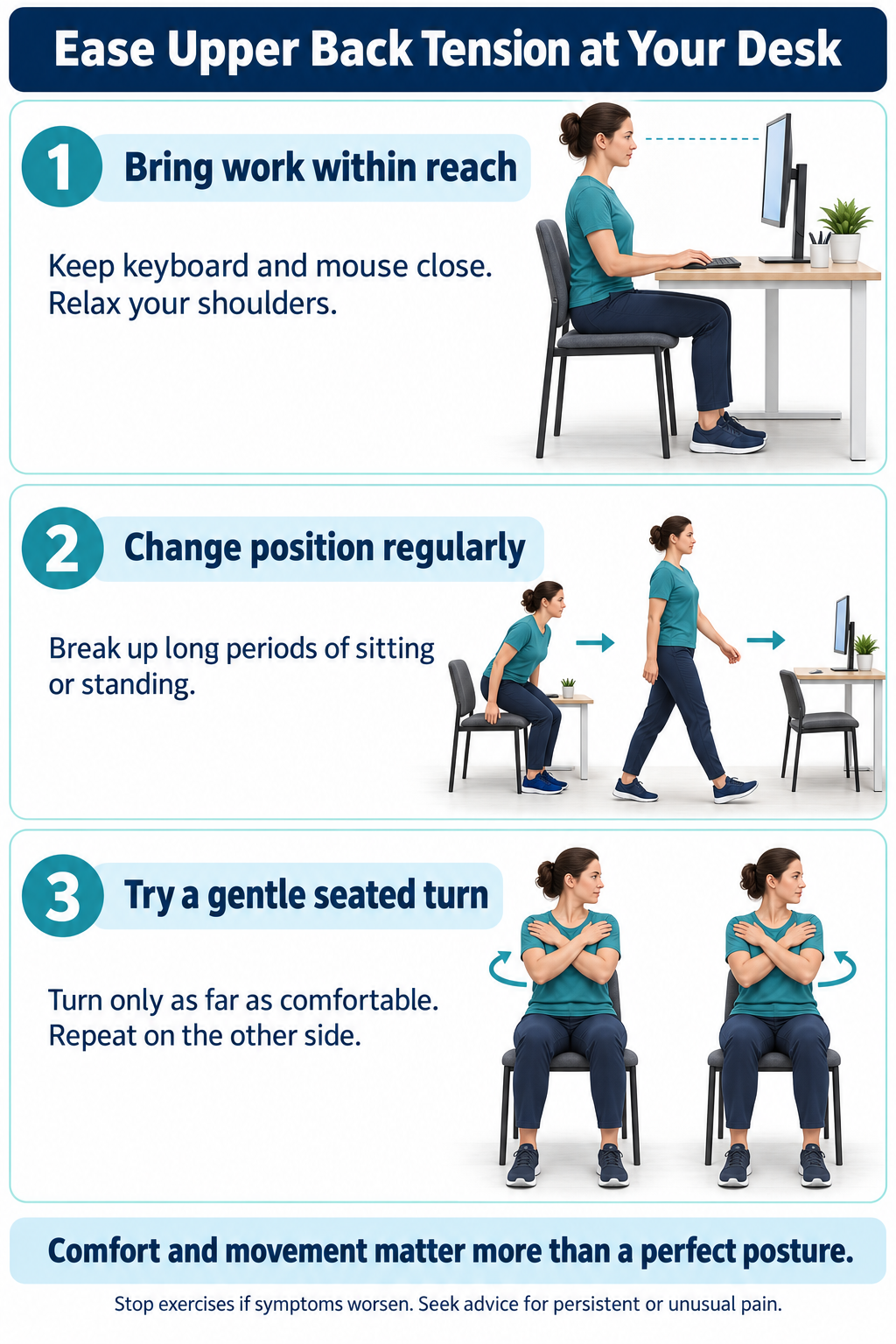
Mistake 1: forcing yourself to sit perfectly straight
Pulling your shoulders back hard and holding your trunk rigid is not a requirement for comfortable desk work. Start with support that lets you relax, then allow small changes as you work.
Cambridge University Hospitals’ advice on posture myths explains that there is no single perfect posture and no clear evidence that a “bad” posture by itself causes back or joint pain. A position can still affect symptoms once you are uncomfortable.
- Let the chair support you instead of hovering away from the backrest.
- Relax unnecessary shoulder and abdominal tension.
- Change position when you begin to feel stiff or tired.
A useful question is “Can I work comfortably and move easily?” rather than “Do I look perfectly upright?” A photo of your posture cannot determine the cause of your pain.
Mistake 2: reaching for the keyboard or mouse
A distant keyboard or mouse can leave your arms reaching forward or out to the side. If the work surface is too high, you may also find yourself lifting your shoulders while typing.
Move the tools you use most into easy reach. The OSHA guidance on keyboard placement recommends relaxed shoulders, elbows near the body, and wrists aligned with the forearms.
- Bring the mouse beside the keyboard rather than beyond a pile of papers.
- Check whether you can type without lifting your shoulders.
- Adjust armrests if they stop you moving close enough to the desk.
Test the setup during your real work. A layout that feels fine for a few keystrokes may be less convenient when you switch repeatedly between typing, documents, and the mouse.
Mistake 3: straining to see the screen
Small text, glare, or a screen placed to one side may encourage repeated leaning or neck turning. Adjust what you are looking at instead of repeatedly reminding yourself to pull your head back.
A useful starting point is a monitor directly in front of you, with its top at or slightly below eye level and text you can read comfortably. OSHA’s monitor setup advice gives a typical viewing range of about 50–100 cm, with adjustments for screen size and vision needs.
- Increase text size if you keep moving toward the display.
- Reduce reflections by changing screen or light placement.
- Place your main screen where you spend most of your viewing time.
If you wear bifocal or progressive lenses, check whether you tip your head back to see the screen. The height that works for someone else may not suit your lenses; ask an eye-care professional if viewing remains difficult.
Mistake 4: making the laptop or phone do every job
A laptop joins the keyboard and screen, which limits how independently you can position them. For longer desk sessions, an external keyboard and mouse can let you raise the screen while keeping your hands at a comfortable level.
Phone use can add another awkward task if you cradle the handset between your shoulder and ear. A suitable headset or hands-free option can make simultaneous phone and computer work easier.
- Use a stable screen stand when appropriate, with a separate keyboard for typing.
- Keep frequently used documents near the screen.
- Choose a phone setup that lets your shoulders relax.
You do not need to buy everything at once. First identify the task that reliably makes you reach, lean, or shrug, then test a change that addresses it.
Mistake 5: staying still until the ache becomes distracting
Even a comfortable workstation needs movement. Replacing an entire day of sitting with an entire day of standing does not solve the problem of staying in one position.
OSHA’s guidance on working positions recommends frequent changes, including small chair adjustments and periodic standing or walking. There is no need to wait for substantial discomfort before taking a pause.
- Stand or walk during a suitable break between tasks.
- Vary computer work with other activities when possible.
- Use reminders if you regularly lose track of time.
For example, use the end of a call as a cue to get up rather than trying to follow a complicated schedule. Ask your workplace about task changes or an ergonomic assessment if your job gives you little freedom to move.
Try two gentle movements away from the keyboard
Choose a stable chair without wheels and make sure there is space around you. These are movement options, not a way to diagnose or forcibly “release” a knot.
For a seated upper-body turn, sit with your feet supported and cross your arms over your chest. Turn your upper body slowly to one side while keeping your hips facing forward, return to the middle, and repeat on the other side.
- Turn only as far as comfortable.
- Keep breathing rather than straining at the end of the movement.
- Begin with a few easy repetitions and stop if symptoms worsen.
The NHS seated exercise instructions illustrate this turn and other gentle movements. If you have recent surgery, a fracture, or specific movement restrictions, get individual advice before trying them.
For a gentle upper-back reach, sit comfortably and extend your hands forward, allowing your upper back to round slightly. Return without forcing the movement or pulling your head down.
- Use a small reach if a longer one feels uncomfortable.
- Keep the movement smooth and unhurried.
- Skip it if it causes sharp pain, tingling, or spreading symptoms.
Gentle movement should be manageable. If you repeatedly feel worse afterward, stop the provoking exercise and ask a physiotherapist to adapt it rather than adding more repetitions.
Check your workstation before buying equipment
Use this comparison to choose one adjustment to try. The aim is to remove unnecessary effort, not to create a rigid checklist that you must maintain every minute.
| What you notice | Check first | Practical adjustment |
|---|---|---|
| Shoulders rise while typing | Keyboard height and armrest position | Adjust so your arms can rest comfortably |
| Mouse arm reaches outward | Mouse distance and desk clutter | Move the mouse nearer the keyboard |
| You lean toward text | Text size, screen distance, and glare | Enlarge text and test a clearer viewing position |
| Neck stays turned | Main screen or document location | Bring frequently viewed material closer to the front |
| Feet do not reach the floor | Chair height relative to the desk | Use suitable foot support if needed |
| Ache builds through long sessions | Task variety and opportunities to move | Add short movement pauses |
After a change, compare similar tasks rather than assuming an immediate improvement proves the cause. A brief note can help you decide whether the adjustment is useful.
- Record the task and how long you worked before discomfort began.
- Change one main setup feature at a time.
- Note whether work, sleep, or movement becomes easier.
Expensive chairs, posture braces, and massage tools are not automatic next steps. If simple adjustments are insufficient, an assessment can help you choose what is actually relevant.
Know when upper back pain needs medical assessment
Arrange a medical review for new unexplained upper-back pain, symptoms that keep returning, or pain that is worsening or interfering with daily life. Mention night pain, unexplained weight loss, a new lump, or a history of significant injury.
Get urgent medical advice if you feel feverish or generally unwell, or if severe pain starts suddenly or worsens quickly. The NHS guidance on back-pain warning signs also identifies situations requiring emergency assessment.
- Seek emergency care for back pain with chest pain or after a serious accident.
- Seek emergency care for new bladder or bowel changes or numbness around the genitals or anus.
- Seek emergency care for pain, tingling, numbness, or weakness affecting both legs.
New or increasing arm numbness or weakness also needs clinical advice. Do not assume that every symptom near the shoulder blades is a desk-related muscle knot.
Conclusion
Desk posture mistakes are most useful to address as practical sources of unnecessary effort: reaching, shrugging, straining to see, and staying still too long. Choose comfortable support, vary your position, and use gentle movement while seeking assessment for persistent, changing, or unusual symptoms.
Frequently asked questions
Does slouching automatically cause upper back knots?
No. A posture may aggravate existing discomfort, but its appearance alone does not establish the cause. Check the task, setup, and time spent in one position.
Should I keep my shoulders pulled back all day?
No. Let them relax and use support where helpful. Repeatedly forcing a rigid posture is not the goal of a comfortable workstation.
What should I adjust first?
Start with the problem you notice most, such as a distant mouse or text you cannot read without leaning. Test one change during your normal work.
How high should my monitor be?
The top at or slightly below eye level is a general starting point. Adjust for your vision and screen so you do not have to crane your neck.
Is a standing desk enough to prevent pain?
No desk guarantees pain prevention. Use standing as one available position and continue to vary your tasks and move throughout the day.
Can I use a laptop for long desk sessions?
You can adapt the setup with a separate keyboard and mouse so screen and hand positions are easier to adjust. Choose a stable arrangement that suits your work.
Which movement can I try during a break?
A gentle seated upper-body turn is one option: feet supported, arms crossed, and a comfortable turn each way. Stop if symptoms worsen or new symptoms appear.
Does a tender spot mean I have myofascial pain syndrome?
No. A tender spot is not enough to diagnose the condition. Persistent or worsening muscle pain should be assessed in the context of your other symptoms.
Should I massage a knot very hard?
Do not treat severe pressure or increasing pain as proof that a treatment is working. Ask a clinician about suitable options when self-care does not help or the diagnosis is unclear.
When should I stop trying desk adjustments and seek help?
Seek assessment if pain persists, worsens, affects sleep or normal activities, or comes with new neurological symptoms. Chest pain, major trauma, or the emergency warning signs above require immediate care.