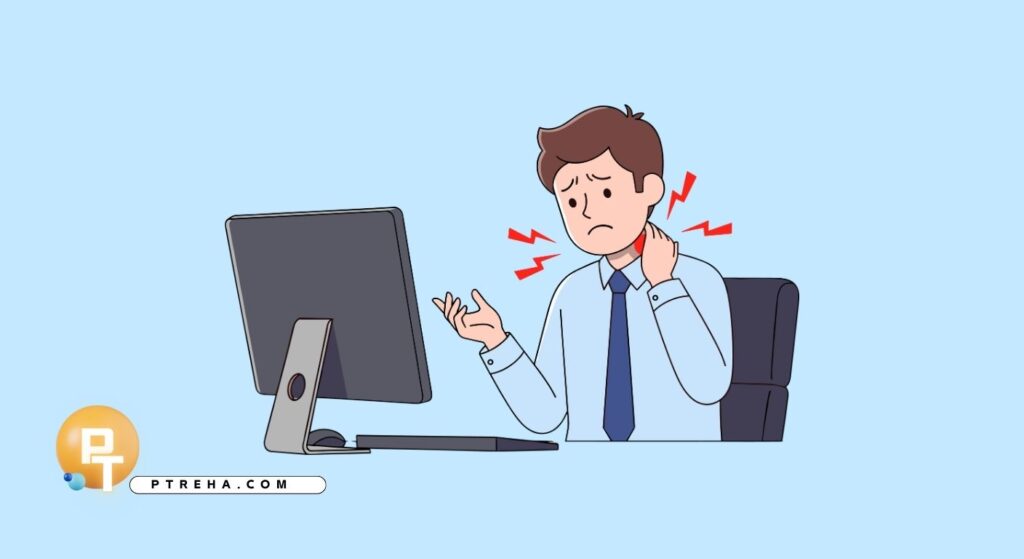
Long periods at a computer can leave the neck feeling tight, stiff, or achy, especially when the same head, neck, and shoulder position is maintained for too long. Tension neck pain from computer use often improves with regular movement, gentle mobility, appropriate stretching, and breaking up prolonged sitting rather than trying to hold one “perfect” posture all day.
Why Computer Use Can Cause Neck Tension
Computer work commonly involves sustained sitting, repeated visual attention, and relatively little movement of the neck and upper body. When the head remains in one position for a long period, the muscles and joints of the neck and upper back may become uncomfortable or stiff.
The problem is not necessarily that one posture is inherently harmful. A more useful approach is to avoid staying in the same position for prolonged periods and regularly change position, move, and adjust the workstation when necessary.
You may notice symptoms such as:
- Aching around the back or sides of the neck
- Tightness across the upper shoulders
- Stiffness when turning the head
- Discomfort between the neck and shoulder blade
- Headaches associated with neck tension
- Increased discomfort after prolonged computer work
- A feeling that the neck needs to “move” after sitting
- Reduced comfort when looking down or to the side
- Upper-back stiffness accompanying the neck symptoms
- Symptoms that improve temporarily after getting up and moving
These symptoms can have several possible causes, so computer use should not automatically be assumed to be the sole cause of neck pain.

What Relief Stretches Can and Cannot Do
Gentle stretching can be useful when neck muscles feel tight and movement is uncomfortable. Neck mobility exercises can also help maintain or restore comfortable movement. NHS physiotherapy resources commonly recommend gentle neck flexion, rotation, side bending, chin retraction, and selected muscle stretches.
Stretching should not be treated as a way to “put the neck back into place.” The goal is simpler: improve comfortable movement and provide a manageable way to interrupt prolonged static activity.
A useful stretching routine should:
- Be gentle rather than forceful
- Stay within a comfortable or tolerable range
- Avoid sudden movements
- Avoid pulling aggressively on the head
- Be performed with relaxed shoulders
- Be adjusted according to symptoms
- Be combined with regular movement
- Not replace appropriate assessment when symptoms persist
- Stop if unusual symptoms develop
- Progress gradually rather than immediately increasing intensity
There is also no need to stretch every neck muscle aggressively. For some people, frequent gentle movement is more comfortable than holding a long static stretch.
1. Gentle Neck Rotation
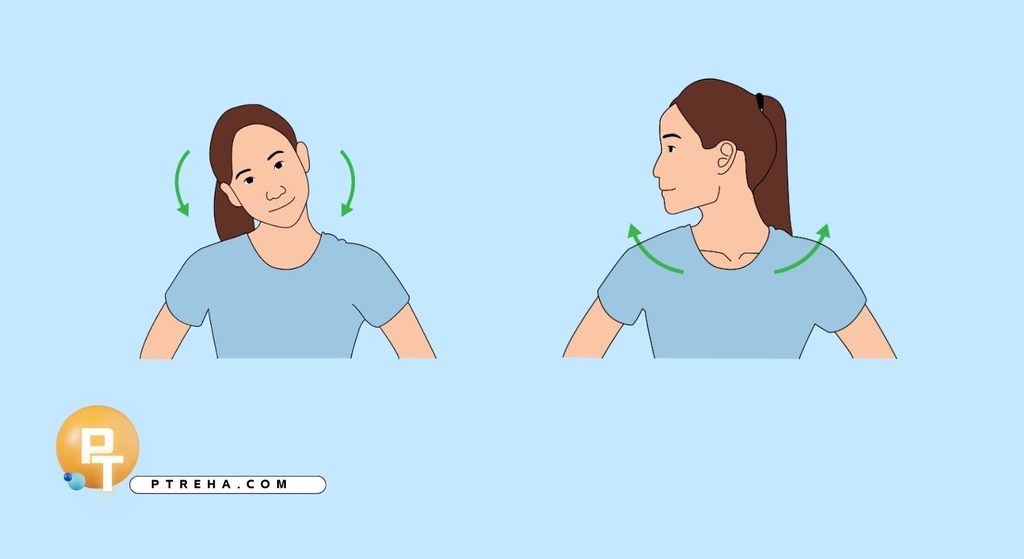
Neck rotation is particularly relevant for people who spend long periods facing a computer screen because it moves the neck away from its habitual forward-facing position.
Sit or stand comfortably with your shoulders relaxed. Slowly turn your head to one side as though looking over your shoulder, stopping at a comfortable limit.
Return to the center and repeat toward the opposite side.
Keep the movement smooth and avoid forcing the final few degrees of rotation. A mild stretching or movement sensation can be acceptable, but sharp pain or new neurological symptoms are reasons to stop.
Try:
- Sitting upright
- Keeping the shoulders relaxed
- Moving slowly
- Looking straight ahead before beginning
- Turning only as far as comfortable
- Returning to the middle between repetitions
- Repeating on both sides
- Avoiding rapid or jerky movements
Example: If you have been looking at one monitor for several hours, a few gentle rotations can provide a simple movement break before you return to work.
2. Neck Side-Bending Stretch
Side bending can gently move the tissues along the side of the neck.
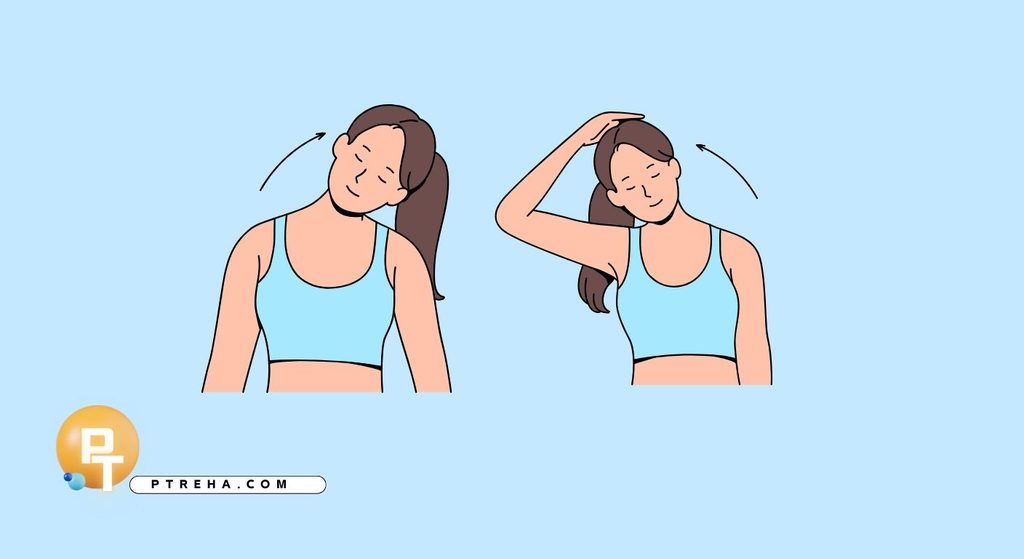
Sit upright and allow your shoulders to remain relaxed. Slowly bring one ear toward the same-side shoulder without lifting the shoulder toward the ear.
You should feel a gentle stretch on the opposite side of the neck. Return to the starting position and repeat on the other side.
Do not force your head farther with your hand. If you use your hand for assistance, it should not be used to aggressively pull the neck.
Helpful reminders:
- Keep your trunk relatively still
- Let the shoulder stay relaxed
- Move slowly
- Do not rotate the head unnecessarily
- Stop before sharp pain
- Repeat on both sides
- Breathe normally
- Do not bounce into the stretch
3. Gentle Neck Flexion
Neck flexion involves bringing the chin toward the chest and can gently move the posterior neck structures.
Begin sitting or standing comfortably. Slowly lower your chin toward your chest until you feel a comfortable stretch or limitation.
Return slowly to the starting position.
Avoid collapsing through the upper back or forcing the head down with your hands.
Consider these points:
- Start from a relaxed position
- Move slowly
- Keep the movement controlled
- Do not force the chin to the chest
- Stop if the movement causes concerning symptoms
- Return to neutral gradually
- Keep breathing normally
- Use a smaller range if you are particularly stiff
This movement may feel useful after prolonged screen work, particularly when the neck feels stiff from maintaining one position.
4. Chin Retraction

Sit with your back supported or stand comfortably. Gently draw your chin backward, as though creating a small “double chin,” without looking down.
Chin retraction is different from simply pushing the head downward. The aim is to gently draw the head backward while keeping the neck relatively upright.
Hold briefly, then relax.
The movement should be small. Do not aggressively push the head backward or clench the jaw.
Try to:
- Keep your eyes facing forward
- Relax your jaw
- Keep your shoulders down
- Move the head backward rather than downward
- Use a small range
- Avoid holding your breath
- Return smoothly to your starting position
- Stop if the movement aggravates your symptoms
Chin retraction is often useful as a movement exercise rather than a forceful stretch.
5. Upper Trapezius Stretch

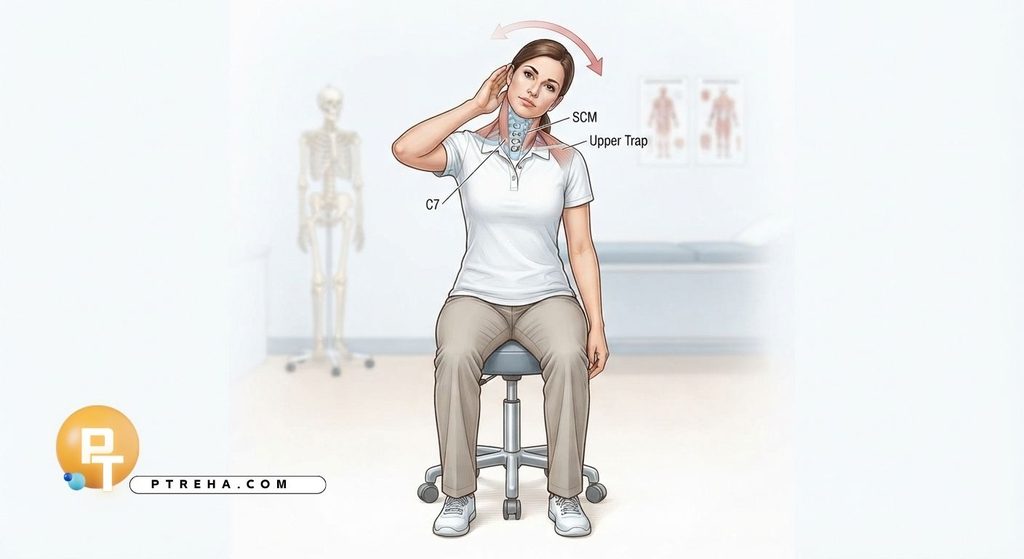
The upper trapezius is one of the muscles that can become uncomfortable during prolonged computer work, although neck pain cannot always be attributed to one muscle.
To gently stretch the right side, sit on your right hand or hold the chair with that hand to keep the shoulder relaxed. Slowly tilt your head toward the left until you feel a gentle stretch on the right side.
Return to the starting position and repeat on the other side.
Some people combine a slight forward movement of the head with the side bend, but the movement should remain gentle.
Avoid:
- Pulling strongly on your head
- Raising the shoulder
- Bouncing
- Holding your breath
- Stretching into sharp pain
- Continuing if dizziness develops
Clinical patient guidance also emphasizes avoiding pulling aggressively on the head during neck muscle stretches.
6. Levator Scapulae Stretch
The levator scapulae connects the upper shoulder blade region with the cervical spine and can become uncomfortable around the neck and upper shoulder region.
Sit comfortably and keep the shoulder of the side being stretched relaxed. Turn your head slightly away from that side and gently angle your gaze downward.
You may feel the stretch around the back and side of the neck toward the upper shoulder blade.
The exact sensation varies between individuals, so do not try to force a particular location.
Keep the exercise gentle:
- Relax the shoulder
- Move slowly
- Avoid pulling hard with the hand
- Stop if symptoms travel into the arm
- Do not bounce
- Breathe normally
- Use a smaller range if necessary
- Repeat on the opposite side

7. Chest-Opening Movement
Computer work often involves prolonged use of the arms in front of the body. Rather than assuming that rounded shoulders are always the cause of neck pain, it can be useful to regularly move the upper body in the opposite direction.
Sit or stand comfortably. Gently bring your shoulders back and down without forcing them, allowing the chest to open.
Hold briefly, then relax.
This is better thought of as a movement exercise than a posture that must be maintained continuously.
Try:
- Keeping the movement comfortable
- Avoiding excessive arching of the lower back
- Relaxing the neck
- Keeping the jaw relaxed
- Moving the shoulder blades gently
- Avoiding forceful squeezing
- Repeating several times during the day
- Combining it with getting up from the desk
Regularly changing position is more useful than attempting to maintain one rigid posture throughout an entire workday.
A Simple Computer-Work Neck Routine
You do not need a complicated program to introduce more movement into a computer-heavy day.
A simple routine can include:
| Exercise | Main purpose | How to perform |
|---|---|---|
| Neck rotation | Maintain comfortable rotation | Slowly turn left and right |
| Side bending | Move the neck laterally | Gently bring ear toward shoulder |
| Neck flexion | Maintain flexion mobility | Slowly bring chin toward chest |
| Chin retraction | Practice controlled head movement | Gently draw chin backward |
| Upper trapezius stretch | Gentle muscle stretching | Side bend while keeping shoulder relaxed |
| Levator scapulae stretch | Gentle posterior neck/shoulder stretching | Turn and angle head gently downward |
| Chest-opening movement | Counter prolonged forward arm position | Gently open the chest and relax |
There is no single repetition or hold time that is appropriate for every person. Clinical patient resources commonly provide ranges such as several repetitions and brief holds, while emphasizing comfortable movement and individual tolerance.
A practical starting routine might include:
- A few gentle neck rotations
- A few side bends
- A few flexion movements
- Several controlled chin retractions
- One gentle upper trapezius stretch per side
- One gentle levator scapulae stretch per side
- Several chest-opening movements
- A short walk after prolonged sitting
The important point is consistency and tolerance rather than chasing a particular number.
How to Use Stretching During a Workday
Doing stretches once at the end of a long workday may be less useful than incorporating movement throughout the day.
If computer work aggravates your neck, break the task into smaller periods and change position regularly. This approach is specifically recommended in physiotherapy patient guidance for people whose symptoms increase during computer work.
Useful strategies include:
- Stand up regularly
- Walk briefly around the room
- Change your sitting position
- Look away from the screen periodically
- Perform gentle neck movements
- Relax your shoulders
- Avoid holding the phone between your shoulder and ear
- Keep frequently used items within comfortable reach
- Avoid prolonged neck rotation toward a second screen
- Alternate between sitting and standing when possible
- Use short movement breaks rather than waiting until pain becomes severe
For example, someone who spends several hours writing at a laptop might perform a few gentle neck movements after completing a task, then stand and walk before beginning the next task.
Improve the Computer Setup
Stretching is only one part of managing computer-related neck discomfort. If the same aggravating activity continues for hours without interruption, exercises may provide only temporary relief.
Consider whether:
- The screen is positioned so you can work without constantly looking down
- The keyboard and mouse allow your shoulders to remain relaxed
- Your chair provides comfortable support
- You are frequently turning your head toward another screen
- Your laptop setup requires prolonged neck flexion
- You can change positions during the workday
- Your work requires long uninterrupted periods at the desk
- Frequently used objects are positioned conveniently
- You have enough space to change posture
- Your workstation allows comfortable movement
There is no universally perfect workstation position. The practical goal is to make the task comfortable and give yourself opportunities to move.
When Stretching Is Not the Right Approach
Neck stretching is not appropriate as a universal solution for every type of neck pain.
Stop an exercise if it causes significant or worsening symptoms, particularly symptoms that are unusual for you. Dizziness, new weakness, significant numbness or tingling, or symptoms extending into the arm should not simply be pushed through with more stretching.
Seek professional medical or physiotherapy assessment when:
- Neck pain follows significant trauma
- You develop new arm or hand weakness
- You develop persistent or significant numbness
- Tingling is worsening or accompanied by weakness
- You experience significant balance or walking problems
- You develop concerning visual symptoms
- Neck movement repeatedly causes dizziness
- Pain is severe or rapidly worsening
- Symptoms do not improve as expected
- You are concerned about the cause of the pain
Urgent assessment may be appropriate for certain combinations of severe neck symptoms and neurological or other concerning signs. The appropriate level of care depends on the overall clinical picture.
What About Heat, Rest, and Activity?
Some people find heat comfortable when neck muscles feel tense. Heat is a symptom-management option rather than a treatment for a specific structural cause, and it should be used safely to avoid burns.
Complete rest is generally not the goal for uncomplicated neck pain. Maintaining comfortable activity and gradually returning to normal movement can be more useful than avoiding movement altogether.
A practical approach is:
- Reduce activities that clearly aggravate symptoms
- Continue comfortable daily movement
- Avoid prolonged bed rest
- Use gentle neck mobility
- Take regular movement breaks
- Gradually increase activity
- Monitor how symptoms respond afterward
- Seek assessment if symptoms persist or change
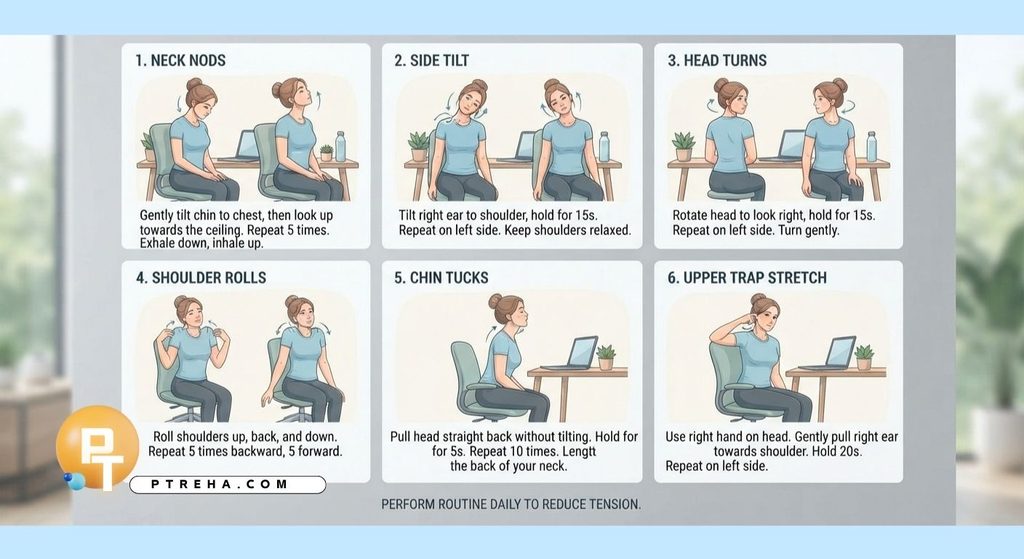
A Practical Five-Minute Desk Routine
When your neck feels stiff after computer work, try a short movement sequence rather than aggressively stretching every tight area.
Begin by sitting comfortably and taking a few relaxed breaths. Then perform gentle neck rotations, side bends, flexion, chin retractions, and shoulder movements.
A simple sequence is:
- Five gentle neck rotations each direction.
- Five comfortable side bends each direction.
- Five gentle neck flexion movements.
- Five controlled chin retractions.
- A brief upper trapezius stretch on each side.
- A brief levator scapulae stretch on each side.
- Several gentle shoulder movements.
- Stand up and walk for a short period.
- Return to the computer in a comfortable position.
- Repeat the movement break later rather than waiting for severe stiffness.
The sequence should feel like movement, not a test of flexibility.
Conclusion
Tension neck pain from computer use is often influenced by prolonged static activity, limited movement, and the demands of the task rather than by one isolated posture or muscle. Gentle neck mobility, appropriate stretches, regular position changes, and practical workstation adjustments can help many people manage everyday stiffness and discomfort.
The most useful approach is usually not to search for one perfect stretch. Instead, use comfortable movement regularly, avoid aggressively forcing the neck, and pay attention to symptoms that require professional assessment.
If neck pain persists, repeatedly returns, interferes with normal activities, or is accompanied by neurological or other concerning symptoms, an individual assessment by a physiotherapist or appropriate healthcare professional can help determine the most suitable management plan.
Frequently Asked Questions
Can computer use really cause neck pain?
Prolonged computer work can contribute to neck discomfort, particularly when it involves sustained positions with little movement. However, neck pain has many possible contributing factors, so computer use should not automatically be considered the only cause.
What is the best stretch for computer-related neck tension?
There is no single best stretch for everyone. Gentle neck rotation, side bending, flexion, chin retraction, and selected upper-neck and shoulder muscle stretches can all be useful depending on the person’s symptoms and movement limitations.
How often should I stretch my neck when working at a computer?
Rather than relying on one long stretching session, incorporate short periods of movement throughout the day. The appropriate frequency depends on your symptoms, workload, and tolerance, so the routine should be adjusted if exercises consistently aggravate your symptoms.
Should neck stretches hurt?
A gentle stretch or mild movement discomfort can occur, but stretching should not be forced into sharp or severe pain. Stop and seek professional advice if an exercise produces concerning symptoms such as new weakness, significant numbness, worsening neurological symptoms, or dizziness.
Should I pull my head with my hand when stretching my neck?
Generally, aggressive pulling is unnecessary. Physiotherapy guidance for neck stretching specifically advises against pulling strongly on the head; controlled active movement or very gentle assistance is preferable.
Is chin retraction the same as fixing bad posture?
No. Chin retraction is a specific controlled movement exercise. It can be useful for practicing neck movement, but it should not be interpreted as evidence that one rigid posture is necessary or that every neck problem is caused by “bad posture.”
Should I stop exercising if my neck feels slightly uncomfortable?
Not necessarily. Some people experience mild discomfort when beginning movement, but symptoms should remain manageable and should not progressively worsen. If an exercise repeatedly causes substantial or prolonged worsening, reduce the range or repetitions and consider assessment by a physiotherapist.
Is it better to sit perfectly upright all day?
No single posture needs to be maintained continuously. A more practical strategy is to use a comfortable workstation position while regularly changing position and moving the neck, shoulders, and rest of the body.
Can stretching prevent computer-related neck pain?
Stretching may help maintain movement and reduce stiffness for some people, but it should not be considered a guaranteed prevention method. Regular physical activity, changing positions, taking movement breaks, and adapting the work environment are also important parts of managing prolonged computer work.
When should I see a physiotherapist for computer-related neck pain?
Consider an assessment when symptoms persist, repeatedly return, limit your daily activities, or do not respond to reasonable self-management. A physiotherapist can assess cervical and upper-body movement, contributing factors, functional limitations, and whether strengthening, mobility work, education, or other interventions are appropriate.
Article Resources
- NHS — Neck pain: NHS neck pain guidance
- Cambridge University Hospitals — Neck exercises and advice: Cambridge University Hospitals neck exercises and advice
- Cambridge University Hospitals — Neck physiotherapy resources: Cambridge University Hospitals Neck physiotherapy resources
- East Lancashire Hospitals NHS Trust — Neck pain information: East Lancashire Hospitals neck pain information
- University Hospitals of Leicester — Guide for people with neck pain: University Hospitals of Leicester neck pain guide
- ChoosePT — Exercise posture break for office workers: ChoosePT office-worker posture break