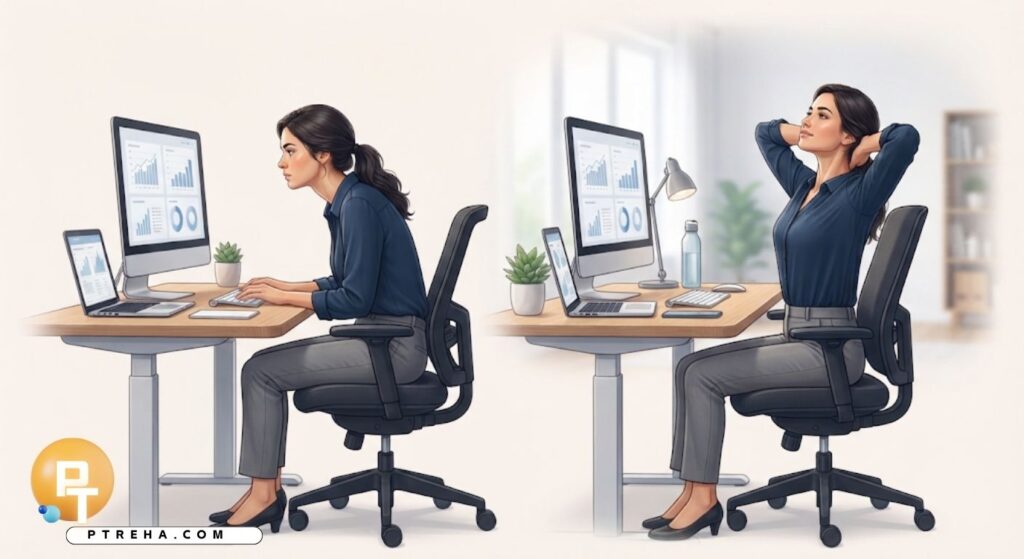
Long work sessions can leave the neck, shoulders, back, wrists, and hips feeling stiff or fatigued, especially when the same position is maintained for a long time.
Posture correction micro-breaks during long work sessions are short periods of movement and position change that help interrupt prolonged static loading, reduce repetitive exposure, and make it easier to return to a comfortable working posture.
What Are Posture Correction Micro-Breaks?
A micro-break is a brief interruption of a continuous work task used to change position, move the body, relax an area under sustained load, or briefly step away from the workstation.
It does not necessarily mean stopping work completely; it can involve standing while reading, walking to another task, changing from keyboard work to a phone call, or performing a few gentle movements.
The purpose is not to maintain one “perfect” posture all day.
The body generally benefits from postural variation, because prolonged static positions can contribute to local muscle fatigue and discomfort.
Occupational guidance recommends incorporating task variation and short rest pauses into computer work, particularly when tasks are repetitive or involve prolonged static posture.
Useful micro-break activities include:
- Standing up from the chair.
- Walking for a short period.
- Changing from sitting to standing.
- Rolling the shoulders gently.
- Moving the neck through a comfortable range.
- Opening and closing the hands.
- Relaxing the grip on the mouse.
- Changing the position of the keyboard or mouse when appropriate.
- Looking away from the monitor.
- Taking several relaxed breaths while releasing shoulder tension.
The most useful break is often the one that changes the activity or body position you have been maintaining.
Why Long Static Work Sessions Can Cause Discomfort
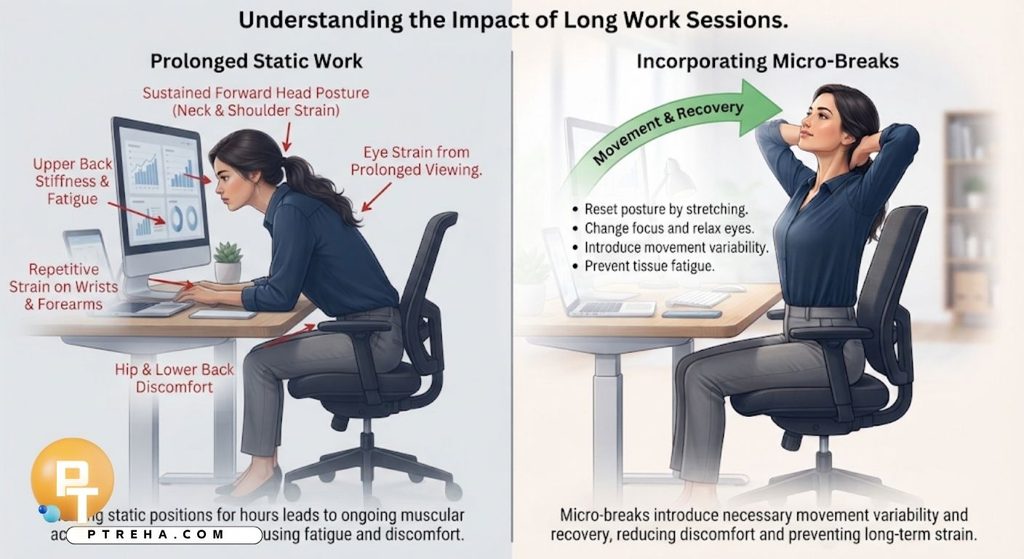
Computer work may appear physically light, but it can involve long periods of relatively little movement.
Holding the head, trunk, arms, and hands in a particular position requires ongoing muscular activity, while repetitive keyboard and mouse movements repeatedly load smaller tissues.
For example, someone who spends several hours writing may gradually move the head closer to the screen, elevate the shoulders, reach farther toward the mouse, or collapse into the chair.
These changes are not necessarily harmful by themselves, but maintaining them without sufficient variation can increase fatigue and discomfort.
A poorly positioned monitor can also encourage forward or backward head positioning.
Workstation guidance emphasizes arranging the monitor and other equipment so that the user can work without unnecessarily awkward neck, shoulder, arm, or wrist positions.
Common problems associated with prolonged computer work can include:
- Neck discomfort.
- Shoulder fatigue.
- Upper-back stiffness.
- Low-back discomfort.
- Wrist or forearm discomfort.
- Hand fatigue.
- Hip stiffness after prolonged sitting.
- Reduced tolerance for maintaining one position.
- Eye discomfort associated with prolonged screen viewing.
- General feelings of physical fatigue.
Micro-breaks are therefore not simply an opportunity to “stretch.” They are a way to introduce movement variability and recovery into the work process.
The Main Principle: Move More, Not Just “Sit Straighter”
Posture correction is sometimes presented as a matter of holding the spine upright, pulling the shoulders back, or keeping the chin tucked throughout the entire workday.
This approach can create another static posture rather than solving the underlying problem of prolonged immobility.
A more practical strategy is to establish a comfortable workstation and then regularly change positions.
A useful approach is:
- Start work in a comfortable, supported position.
- Avoid deliberately rigid posture.
- Change position before significant discomfort develops when possible.
- Alternate between different work activities.
- Stand when a task can reasonably be performed standing.
- Walk during appropriate non-screen tasks.
- Relax the shoulders instead of repeatedly forcing them backward.
- Keep the head balanced rather than actively holding it in place.
- Allow the trunk to move periodically.
- Use short breaks to interrupt repetitive work.
OSHA guidance similarly emphasizes neutral positioning together with adjustable workstations, task variation, and short recovery pauses rather than relying on posture alone.
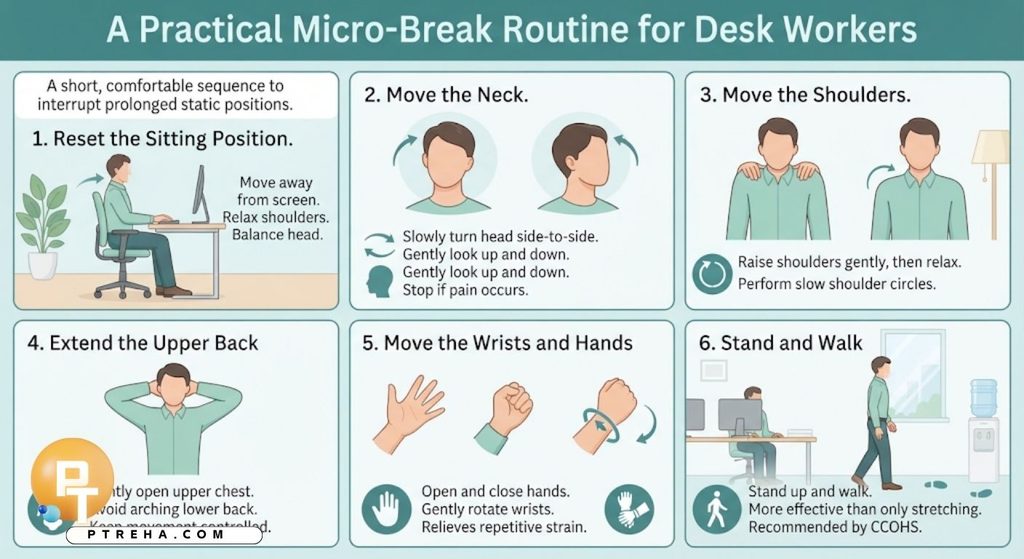
A Practical Micro-Break Routine for Desk Workers
A micro-break does not need to become a long exercise session.
For many office workers, a short sequence performed comfortably can be enough to interrupt a prolonged static position.
1. Reset the Sitting Position
Move your body slightly away from the screen and allow your feet to rest comfortably on the floor or an appropriate footrest.
Check that your shoulders are relaxed and your head is balanced rather than deliberately pulled backward.
2. Move the Neck
Slowly turn your head to one side and then the other within a comfortable range.
You can also gently look up and down without forcing the end position.
Stop if the movement causes pain, dizziness, or other concerning symptoms.
3. Move the Shoulders
Raise the shoulders gently toward the ears and then let them relax.
Follow with several slow shoulder circles if they feel comfortable.
The objective is movement, not forcing the shoulders into a particular “correct” position.
4. Extend the Upper Back
Sit or stand comfortably and gently bring the upper chest into a more open position.
Avoid aggressively arching the lower back.
The movement should feel controlled and comfortable.
5. Move the Wrists and Hands
Open and close the hands several times and gently move the wrists through comfortable ranges.
This is particularly useful after prolonged keyboard or mouse work, because repetitive computer tasks can place sustained demands on the hands and forearms.
6. Stand and Walk
If practical, stand up and walk to another part of the workplace.
Walking can provide a more meaningful change in body position than remaining seated and performing several stretches at the desk.
CCOHS specifically recommends standing and walking during workstation breaks when possible.
How Often Should You Take Micro-Breaks?
There is no single schedule that is appropriate for every worker, because the ideal frequency depends on the task, workload, workstation, symptoms, and individual needs.
The important principle is to avoid relying on one long break after many hours of uninterrupted computer work.
Shorter interruptions distributed through the work period can help provide recovery from repetitive or static tasks.
OSHA recommends frequent short pauses for computer users and gives a five-minute break from computer tasks each hour as one practical example.
CCOHS also recommends breaking up workstation activity and, where possible, using several minutes of standing or walking.
A practical schedule might look like this:
| Work situation | Practical micro-break strategy | Example |
|---|---|---|
| Long typing session | Brief movement interruption | Stand, relax hands, move shoulders |
| Mouse-heavy task | Change task and move | Walk to another workstation or use a non-mouse task |
| Video meeting | Change position when possible | Stand during an appropriate portion of the meeting |
| Writing or studying | Short movement pause | Stand and walk before starting the next section |
| Long sitting period | Position variation | Alternate sitting and standing |
| Repetitive data entry | Task rotation | Alternate computer work with another suitable task |
| Screen-heavy work | Visual and physical pause | Look away, blink, stand, and move |
| Neck/shoulder fatigue | Reduce static loading | Change position and gently move the neck and shoulders |
These are examples rather than rigid prescriptions.
Your workload and symptoms should determine how you organize movement throughout the day.
Micro-Breaks for Common Work Situations
Different tasks create different movement demands, so the break should address what you have actually been doing.
If You Have Been Typing
After a prolonged typing period, move the hands away from the keyboard and let the forearms relax.
Try opening and closing the hands, gently moving the wrists, and lowering any unnecessary shoulder tension.
If possible, alternate computer work with another task that uses the upper limbs differently.
If You Have Been Using a Mouse
Mouse work can involve repeated small movements and a relatively fixed arm position.
Keep the mouse close enough that you do not have to reach excessively, and use task variation when possible.
During a micro-break:
- Release your grip.
- Let the arm rest.
- Move the elbow through a comfortable range.
- Relax the shoulder.
- Open and close the hand.
- Stand or walk if practical.
If You Have Been Reading From a Monitor
Screen position can influence head and neck posture.
A monitor that is poorly positioned may encourage excessive neck flexion, extension, or rotation.
During a break:
- Look away from the screen.
- Let the eyes focus at a greater distance.
- Stand up.
- Move the neck gently.
- Change the position of the trunk.
- Return to the workstation only after resetting comfortably.
If You Have Been Sitting in a Long Meeting
A meeting does not necessarily require continuous sitting.
When appropriate, stand during part of the meeting, change your leg position, or walk during an audio-only portion.
The goal is to introduce movement without interfering with the work itself.
A Two-Minute Posture Micro-Break
When time is limited, use a short routine instead of skipping the break completely.
First 30 seconds: stand and reset
Stand up from the chair, allow the arms to hang comfortably, and take a few relaxed breaths.
Next 30 seconds: neck and shoulders
Slowly rotate the head from side to side and perform a few comfortable shoulder movements.
Next 30 seconds: upper body
Gently move the upper trunk and bring the chest through a comfortable range of motion.
Avoid forcing the spine into an exaggerated position.
Final 30 seconds: walk
Walk around the room or workplace before returning to the workstation.
This routine is not intended to diagnose or treat a musculoskeletal condition.
It is simply a practical movement interruption for people who tolerate these movements comfortably.
Combine Micro-Breaks With Better Workstation Positioning
Micro-breaks are useful, but they should not be used to compensate for a workstation that repeatedly forces you into an awkward position.
A workstation should allow the user to change position and work with relatively neutral joint alignment.
OSHA describes neutral computer-working posture as including a balanced head, relaxed shoulders, elbows relatively close to the body, straight wrists, and supported feet.
Check the following:
- Place the monitor directly in front of you.
- Position the monitor so you can view it without excessive neck movement.
- Keep frequently used equipment within comfortable reach.
- Position the keyboard so the wrists can remain relatively straight.
- Keep the mouse close enough to avoid unnecessary reaching.
- Adjust the chair to provide appropriate support.
- Keep the feet supported.
- Avoid resting against sharp desk edges.
- Use adjustable equipment when available.
- Change your working position throughout the session.
A comfortable setup should make movement easier, not lock you into one prescribed posture.
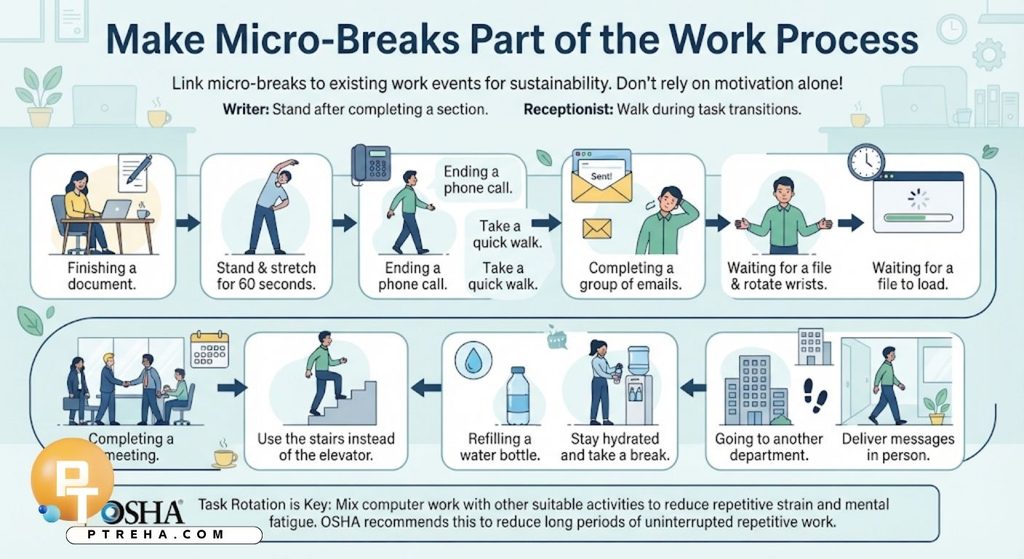
Make Micro-Breaks Part of the Work Process
One of the easiest ways to make micro-breaks sustainable is to connect them to existing work events rather than relying entirely on motivation.
For example, a writer could stand after completing a section, while a receptionist could walk during an appropriate transition between tasks.
Try linking movement to:
- Finishing a document.
- Completing a group of emails.
- Ending a phone call.
- Sending a report.
- Completing a meeting.
- Waiting for a file to load.
- Switching between work applications.
- Completing a spreadsheet section.
- Refilling a water bottle.
- Going to another department.
Task rotation can be especially useful because it changes both the mental and physical demands of work.
OSHA recommends mixing computer tasks with other suitable activities to reduce long periods of uninterrupted repetitive work.
What Should You Avoid During a Micro-Break?
A micro-break should not become another source of unnecessary physical stress.
Avoid treating the break as an opportunity to aggressively stretch every tight area or repeatedly force joints to their end range.
Keep these principles in mind:
- Do not force a painful stretch.
- Do not bounce aggressively into a movement.
- Do not hold your breath.
- Do not forcefully pull the head into position.
- Do not repeatedly crack joints as a posture “correction.”
- Do not assume pain means you need a stronger stretch.
- Do not ignore persistent numbness or tingling.
- Do not use exercise to compensate for a severely unsuitable workstation.
- Do not remain in the same position simply because it is labeled “ergonomic.”
- Do not turn every micro-break into a demanding workout.
The objective is comfortable movement and variation.
When Discomfort Needs More Attention
Occasional stiffness after prolonged work does not automatically indicate an injury.
However, persistent or worsening symptoms deserve more attention, particularly when they interfere with normal activities.
Work-related musculoskeletal symptoms can include pain, stiffness, reduced movement, tingling, numbness, weakness, swelling, or changes in grip strength.
Consider seeking an appropriate clinical assessment if you experience:
- Persistent pain despite changing your work habits.
- Increasing numbness or tingling.
- New or progressive weakness.
- Significant loss of movement.
- Recurrent symptoms that interfere with work.
- Swelling that does not settle.
- Symptoms that repeatedly worsen during work.
- Symptoms that continue outside working hours.
- Significant difficulty using the affected limb.
- Any concerning symptoms that require medical evaluation.
A physiotherapist or other appropriate healthcare professional can assess the individual presentation and determine whether workstation modification, exercise, activity modification, or further evaluation is appropriate.
A Simple Daily Micro-Break Plan
A useful plan should be realistic enough to follow during an actual workday.
Before beginning work, check the workstation and make sure the monitor, keyboard, mouse, chair, and feet are positioned comfortably.
During the session, avoid waiting until you are extremely stiff before moving.
Use natural transitions in your workload to introduce short changes in position.
A practical routine can include:
- Begin with a comfortable seated position.
- Check your shoulders and hand tension.
- Work for a period appropriate to the task.
- Interrupt prolonged static work with movement.
- Stand during suitable tasks.
- Walk when practical.
- Alternate computer and non-computer activities.
- Perform gentle neck and shoulder movements when comfortable.
- Move the hands after repetitive keyboard or mouse work.
- Look away from the screen periodically.
- Return to work in a comfortable position.
- Adjust the workstation if the same awkward posture repeatedly returns.
The aim is not to achieve perfect posture.
It is to create a work pattern in which movement, variation, and recovery are normal parts of the day.
Conclusion
Posture correction micro-breaks during long work sessions are most useful when they are viewed as movement opportunities rather than strict posture exercises.
Short periods of standing, walking, changing tasks, relaxing the upper limbs, and moving the neck and trunk can interrupt prolonged static and repetitive work.
Good workstation setup remains important, but even a well-adjusted workstation should not require one fixed posture for hours.
The practical goal is a comfortable working position that can change regularly according to the task, individual tolerance, and work environment.
Frequently Asked Questions
How long should a posture micro-break be?
There is no single duration that suits everyone.
A micro-break can be brief, particularly when it is used frequently to change position, while longer breaks can provide additional opportunity to stand, walk, or step away from the workstation.
Should I stretch during every micro-break?
No.
Stretching is only one possible component of a break.
Standing, walking, changing tasks, moving the joints gently, or simply releasing sustained muscle tension can also provide useful variation.
Is sitting with perfect posture enough to prevent discomfort?
No.
A theoretically good sitting position can still become uncomfortable if maintained for too long.
Ergonomic guidance emphasizes variation, movement, and task organization alongside neutral working positions.
Should I use a timer for micro-breaks?
A timer can be useful if you tend to become absorbed in work and forget to move.
However, linking movement to natural work transitions can be equally practical and may make the habit easier to maintain.
Can I take micro-breaks while working from home?
Yes.
Home workers can use the same principles by standing during phone calls, walking between tasks, changing sitting positions, or briefly stepping away from the computer.
Are micro-breaks useful if my workstation is already ergonomic?
Yes.
Ergonomic equipment can reduce awkward positioning, but it does not eliminate the effects of prolonged static or repetitive work.
Movement and task variation remain important.
What if my neck feels stiff after computer work?
Start by changing position and moving gently rather than immediately performing forceful stretching.
If the stiffness is persistent, recurrent, worsening, or accompanied by neurological symptoms such as numbness or weakness, an appropriate clinical assessment may be warranted.
Can standing replace sitting breaks?
Standing is another position rather than a complete replacement for movement.
Alternating between sitting, standing, walking, and other appropriate activities provides greater variation than remaining in one position for the entire work period.
Should I exercise during every work break?
Not necessarily.
Work breaks do not need to become exercise sessions.
For many people, the priority is simply to interrupt prolonged static or repetitive activity with comfortable movement.
What is the most important habit for long computer sessions?
Avoid allowing long periods of uninterrupted static work to become the default.
Combine a reasonably adjusted workstation with regular changes in position, task variation, short movement pauses, and attention to early symptoms.
Resources
- Occupational Safety and Health Administration (OSHA), Computer Workstations – Work Process and Recognition: OSHA Computer Workstations – Work Process and Recognition
- Occupational Safety and Health Administration (OSHA), Computer Workstations – Good Working Positions: OSHA Good Working Positions
- Canadian Centre for Occupational Health and Safety (CCOHS), Office Ergonomics – Stretching at the Workstation: CCOHS Stretching at the Workstation
- Canadian Centre for Occupational Health and Safety (CCOHS), Office Ergonomics – Positioning the Monitor: CCOHS Positioning the Monitor
- Canadian Centre for Occupational Health and Safety (CCOHS), Office Ergonomics – Major Work-Related Risk Factors: CCOHS Major Work-Related Risk Factors
- Canadian Centre for Occupational Health and Safety (CCOHS), Working in a Sitting Position: CCOHS Working in a Sitting Position