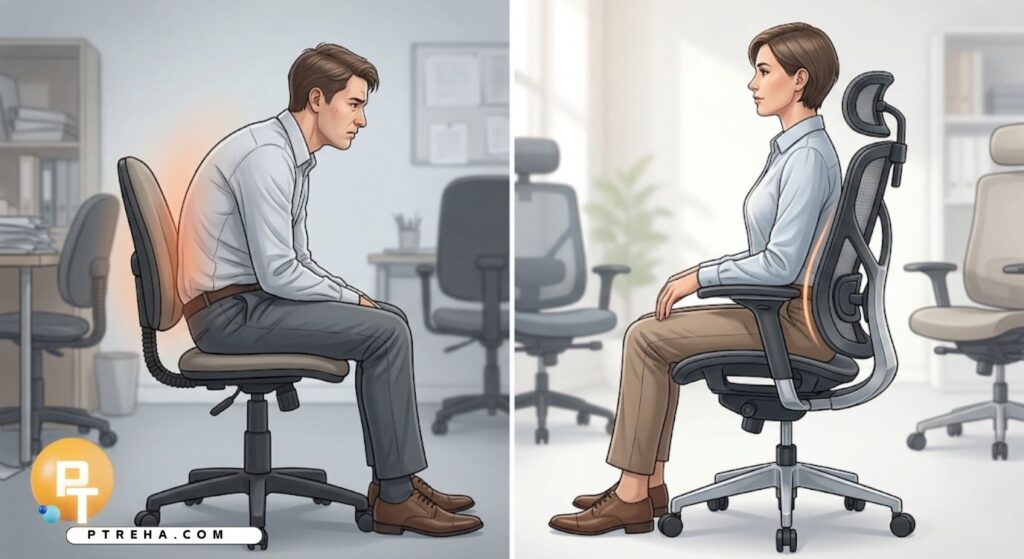
If you spend most of your workday seated, your chair is doing more to shape your spine than any stretch routine ever could.
Choosing the right office chair for lower back support means matching lumbar curve, seat depth, height, and recline to your own body rather than picking whatever looks comfortable in a showroom.
This article breaks down exactly what to look for, what to avoid, and how to set up any chair — new or old — to protect your lower back.
Why Your Chair Matters More Than You Think
Sitting is not a neutral, passive activity for your spine.
Every hour spent in a chair with poor lumbar support gradually pulls the lower back out of its natural curve, shifting load onto discs, ligaments, and small stabilizing muscles that were never meant to carry that strain for eight hours a day.
A well-designed chair does not eliminate the need for movement, but it does reduce the mechanical stress that builds up during long stretches of sitting.
Think of it as a support system, not a cure — it works best alongside good posture habits and regular breaks.
Here is what poor chair support tends to cause over time:
- Increased pressure on the lumbar discs, especially in a slouched position
- Rounded lower back (posterior pelvic tilt) that flattens the natural lumbar curve
- Overworked hip flexors and underused glutes from prolonged flexed hip positions
- Shoulder and neck tension as the body compensates for a collapsed spine
- Reduced blood flow to the lower limbs from poor seat depth or height
Understanding Lumbar Support and Spinal Alignment
The Natural Curve of the Lower Back
The lumbar spine has a slight forward curve called lordosis.
This curve helps distribute body weight evenly across the vertebrae and discs, and it needs to be preserved — not flattened or exaggerated — while sitting.
A chair that supports this curve fills the gap between your lower back and the backrest, so your spine doesn’t have to work to maintain the position on its own.
Without that support, most people unconsciously slump within minutes of sitting down.
What Happens When Support Is Missing
When the lumbar curve collapses, the pelvis tends to tilt backward, and the spine rounds into flexion.
This position increases pressure on the front portion of the intervertebral discs, which is a common contributor to lower back discomfort after long sitting sessions.
Over weeks and months, this repeated flexion can also contribute to muscle imbalances, particularly tight hip flexors and weakened deep core stabilizers.
This is why chair choice is not just about comfort — it is a genuine biomechanical factor in lower back health.
Key Features to Look for in an Office Chair
Adjustable Lumbar Support
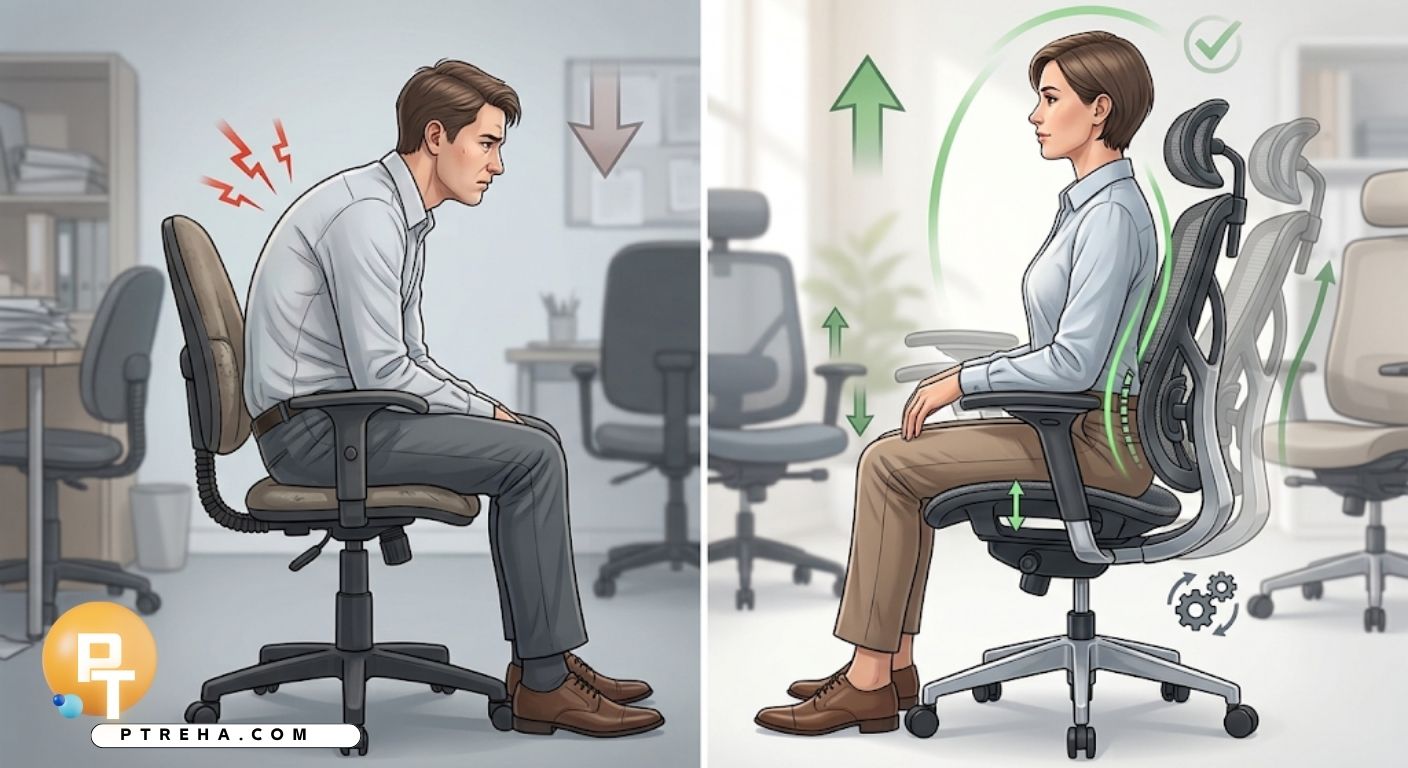
Look for a chair where the lumbar support can move up, down, and sometimes in and out.
A fixed lumbar bump that doesn’t align with your specific lower back curve can do more harm than good.
Good examples include chairs with a height-adjustable lumbar pad, mesh chairs with a sliding lumbar strap, or chairs with an inflatable lumbar cushion you can pump to your preferred firmness.
Seat Depth and Width
Seat depth should allow two to three finger-widths of space between the front edge of the seat and the back of your knees.
A seat that’s too deep forces you to either slouch to reach the backrest or sit without lumbar contact at all.
Chairs with a sliding seat pan are especially useful here, since they let shorter or taller users adjust depth independently of height.
Seat width matters too — there should be enough room for hips and thighs without armrests pressing into your sides.
Seat Height and Armrests
Your feet should rest flat on the floor (or on a footrest) with your knees at roughly a 90-degree angle, hips level with or slightly higher than your knees.
Armrests, when adjusted correctly, should let your shoulders relax rather than shrug upward or droop down.
- Adjustable seat height with a wide range for different desk heights
- Armrests that move up/down, in/out, and ideally forward/back
- A seat pan with a slight waterfall edge to reduce pressure behind the knees
- Enough clearance under the desk for full leg movement
Backrest Recline and Tilt
A backrest that reclines slightly, somewhere between 100 and 110 degrees, tends to reduce lumbar disc pressure compared to sitting bolt upright.
A tilt-lock or tension-adjustable recline lets you shift position throughout the day instead of staying frozen in one posture.
- Recline tension that matches your body weight, not too stiff or too loose
- A tilt-lock feature to fix the angle during focused tasks like typing
- Synchro-tilt mechanisms that move the seat and backrest together for smoother transitions
- A headrest option if you also want upper spine and neck support
Material and Cushioning
Cushioning should be firm enough to support your weight without bottoming out, but not so hard that it creates pressure points.
Mesh backs promote airflow and often flex naturally with your spine, while foam seats vary widely in density and support.
- Medium-density foam that holds shape after repeated use
- Breathable mesh or fabric for chairs used in warmer environments
- A seat pan that doesn’t feel like it’s sinking after a few weeks of use
- Fabric that doesn’t trap heat or cause sliding on the seat surface
Comparing Common Office Chair Types
Different chair categories emphasize different features.
This table gives a general comparison to help narrow down what fits your needs.
| Chair Type | Lumbar Support | Adjustability | Best Suited For |
|---|---|---|---|
| Ergonomic mesh chair | Often adjustable, contoured | High (seat depth, tilt, armrests) | Long desk hours, warmer climates |
| Executive leather chair | Usually fixed, padded | Moderate (recline, height) | Shorter sitting periods, meetings |
| Kneeling chair | None (relies on posture, not lumbar contact) | Low | Short-duration use, posture variation |
| Task chair (budget) | Minimal or fixed | Low to moderate | Occasional use, tight budgets |
| Saddle-style chair | None (hip-open seated position) | Low to moderate | Users seeking an open hip angle |
| High-end ergonomic chair | Fully adjustable, dynamic | Very high | Full-time desk workers with prior back issues |
How to Set Up Your Chair for Lower Back Support
Even a well-designed chair will fail to help if it’s set up incorrectly.
Use this sequence any time you get a new chair or move to a different desk:
- Sit fully back in the seat so your lower back touches the backrest
- Adjust seat height until your feet rest flat and knees sit near 90 degrees
- Move the lumbar support up or down until it fills the curve of your lower back
- Adjust seat depth so there’s a small gap behind your knees
- Set armrests so shoulders stay relaxed, not raised or dropped
- Adjust recline tension so the backrest moves with you but doesn’t collapse backward
- Position your monitor at eye level to avoid leaning forward and losing lumbar contact
Common Mistakes That Undermine Lower Back Support
Many people own a good chair but still experience discomfort because of small setup or habit errors.
Watch for these:
- Sitting on the front edge of the seat, which removes lumbar contact entirely
- Leaving the lumbar support in a default position instead of adjusting it to your spine
- Choosing a chair based on appearance rather than adjustability
- Ignoring seat depth and only checking height when trying a new chair
- Ratcheting the backrest fully upright and locking it there for hours
- Using a chair that’s ergonomically sound but paired with a desk at the wrong height
- Sitting in the same position for hours without shifting or standing up
Complementary Habits That Support a Good Chair
A chair is one part of the equation.
These habits work alongside proper lumbar support to protect your lower back over the long term:
- Stand up and move for a minute or two every 30 to 45 minutes
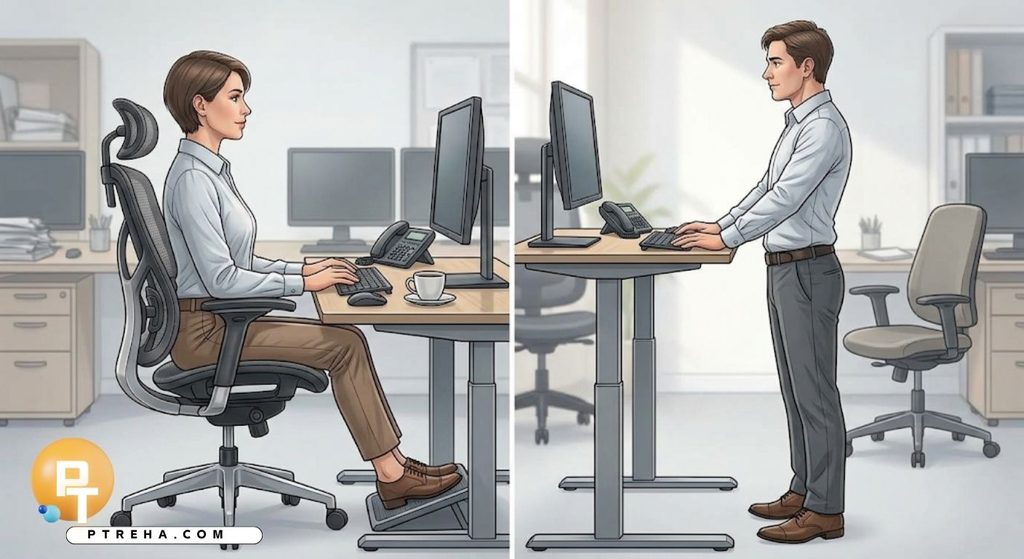
- Use a footrest if your feet don’t comfortably reach the floor
- Alternate between sitting and standing if you have a height-adjustable desk
- Do brief hip flexor and glute activation exercises during breaks
- Keep frequently used items within arm’s reach to avoid repeated twisting
- Reassess your chair setup if your desk, monitor, or work habits change
When a Chair Alone Isn’t Enough
If lower back discomfort persists even after correcting your chair setup, posture, and movement habits, the issue may involve underlying muscular imbalances, disc pathology, or other conditions that a chair cannot fix on its own.
Persistent pain, numbness, tingling, or pain that radiates down the leg are signals to have the issue assessed by a physical therapist or physician rather than relying solely on equipment changes.
Conclusion
Choosing the right office chair for lower back support comes down to a handful of adjustable features — lumbar support, seat depth, height, recline, and cushioning — matched carefully to your own body and daily habits.
No chair replaces movement, but the right one significantly reduces the mechanical strain that builds up during long sitting hours.
Take the time to test adjustability in person when possible, set the chair up correctly from day one, and pair it with regular movement breaks for the best long-term results for your spine.
Frequently Asked Questions
What is the single most important feature in an office chair for lower back support?
Adjustable lumbar support is generally the most important feature, since it directly fills the natural curve of your lower back and prevents the spine from collapsing into a rounded position.
Without it, other features like recline or cushioning have less impact on spinal alignment.
How do I know if a chair’s lumbar support fits my back?
The lumbar pad or curve should sit at the point where your lower back naturally curves inward, usually just above the beltline.
If you feel a gap between your back and the support, or if the support presses uncomfortably into one spot, it isn’t adjusted correctly for your spine.
Is a mesh chair better than a padded chair for lower back pain?
Neither material is automatically better; what matters more is adjustability and how well the chair supports your specific lumbar curve.
Mesh chairs tend to flex naturally with movement and stay cool, while padded chairs can offer more contouring but may compress over time.
Can a kneeling chair help with lower back support?
Kneeling chairs shift weight onto the shins and open the hip angle, which some people find helpful for posture awareness, but they don’t provide direct lumbar support.
They’re generally better used for short periods rather than as a full-time seating solution.
How often should I adjust my chair once it’s set up?
You should reassess your chair setup whenever your desk height changes, you switch tasks that require a different posture, or you notice yourself slouching more than usual.
Otherwise, a properly adjusted chair typically doesn’t need frequent changes.
Does chair price correlate with better lower back support?
Higher price often correlates with more adjustability and durability, but it doesn’t guarantee a good fit for your body.
A moderately priced chair with the right adjustable features can outperform an expensive chair that doesn’t match your proportions.
Should I sit fully upright or reclined for the best lower back support?
A slight recline, generally between 100 and 110 degrees, tends to reduce pressure on the lumbar discs compared to sitting perfectly upright.
The key is that the backrest actively supports your lower back at that angle rather than leaving a gap.
Can a good chair fix existing lower back pain?
A good chair can reduce mechanical strain and support better posture, but it cannot resolve underlying issues like disc problems, muscle imbalances, or nerve involvement on its own.
Persistent or worsening pain should be evaluated by a healthcare professional.
How long can I sit in an ergonomic chair before it stops helping?
Even the best chair loses its benefit if you stay in one position for too long, generally beyond 45 to 60 minutes without moving.
Regular position changes and short breaks are necessary regardless of how supportive the chair is.
What’s the best way to test a chair before buying it?
Sit in the chair for at least 10 to 15 minutes while doing a typical task, such as typing or reading, rather than just sitting briefly.
Check that you can reach all the adjustment points easily and that your lower back stays in contact with the lumbar support throughout.
Resources
- Occupational Safety and Health Administration (OSHA) – Computer Workstations eTool: https://www.osha.gov/etools/computer-workstations
- National Institute of Neurological Disorders and Stroke – Low Back Pain Fact Sheet: https://www.ninds.nih.gov/health-information/disorders/low-back-pain
- Centers for Disease Control and Prevention (CDC) – Ergonomics Resources: https://www.cdc.gov/niosh/ergonomics/
- American Physical Therapy Association (APTA): https://www.apta.org